Tag: custom wordpress theme

  • How to Add New Ad Slot in WordPress Theme using Adrotate Plugin

    An Advertisement-Ready Website, a recent project by TheCreatology, was configured with Adrotate Plugin. The plugin has extensive features for Ad management, Click Tracking & Campaign Management etc. with detailed reporting, which also we will be using in our Tutorial. This tutorial is a request from a client, which is Quick-n-Easy tutorial, as we will learn to add new advertisement slot using adrotate in WordPress theme.
    Get Started - Add Ad Slot Using Adrotate
    Add New Ad Slot Using Adrotate

    For your ease, I have divided this tutorial into three sections: 1) Add/Install Adrotate Plugin, 2) Add/Create New Ads with Adrotate & 3) Display Ad Slot Code in Theme

    Step 1: Add/Install Adrotate Plugin

    To install WordPress Adrotate plugin, login to WordPress dashboard:

    • Navigate to Dashboard > Plugins > Add new Plugin.
    • Search for Adrotate plugin and click to install it.(Refer to screenshot below)
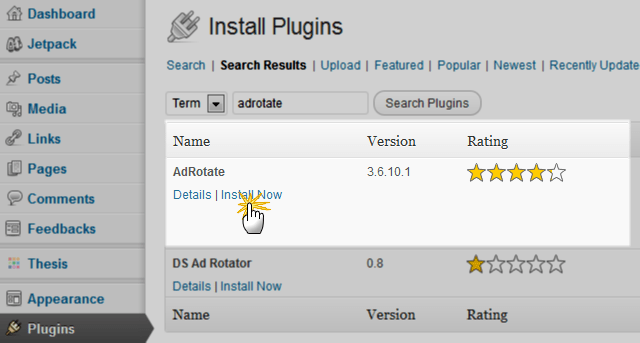
    Step1 Install adrotate plugin
    Install Adrotate WordPress Plugin
    • Once the plugin is installed, click on Activate link to complete the installation of plugin.

    Now that we are done with the installation of plugin, we can move on to create new ad banners.

    Step 2: Add/Create New Ad Banner with Adrotate

    Adding new ads is just a click-a-way thing and a bit of focus is required. Follow quick steps below:

    • Login to WordPress Dashboard and navigate to Dashboard > Adrotate
    • Click on Add New to add ad banner just like in the screenshot below.
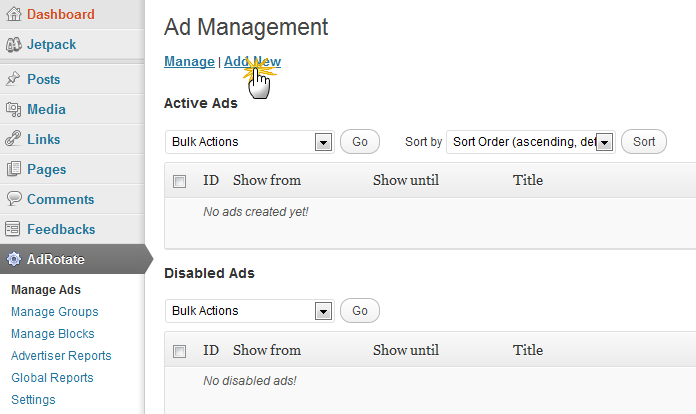
    Step2-1 Add New Ad in Adrotate
    Navigate to Adrotate Management Screen
    • In next screen, you will see a form prompting about new Ad details. Fill the required fields that is Title, Ad Code & Display Period. (Note: Advance Settings are optional, depending upon your requirement.)
    • For your reference, you can memorize Ad unit ID, which will be required in Step 3 (refer the screenshot).
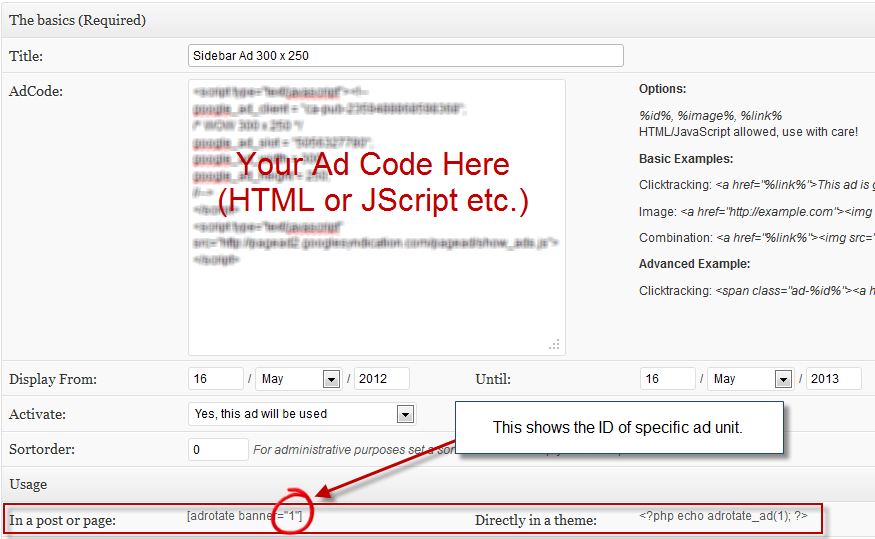
    Step2-2 Add New Ad in Adrotate
    Add new Ad unit
    • Hit Save Ad button once done.

    Step 3: Display Ad Slot in Theme

    In our previous step, we added Ad Unit, where as this step will integrate Ad Code in theme. Adrotate Ad Unit can be displayed in two ways: 1) Using Adrotate Widget & 2) Using Short Code or PHP Code

    USING ADROTATE WIDGET

    This is an easy method and recommended option for people who don’t like to code. Follow simple steps below to display ad slot using adrotate widget:

    • Login to WordPress Admin and Navigate to Dashboard > Appearances > Widgets.
    • In the available widgets, Drag Adrotate Widget to the Widgetized Area, just like in screenshot below.
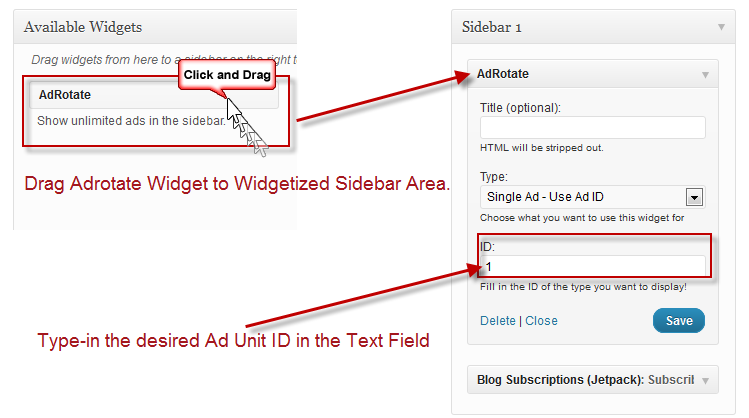
    Step3-1 Display Ad Using Adrotate Widget
    Display Ad in Sidebar using Adrotate
    • Type-in, the desired Ad unit ID, which you memorized while creating Ad Unit in Step 2. If you are not sure about the ID, simply Navigate to Dashboard > Adrotate and find the Ad Slot ID
    • Hit Save button to update the changes.

    USING pHp CODE

    A bit complex method, as you either need to have developer skill-set or a developer to fix it, as a slight mistake may end up breaking theme layout or crash the website. The method comparatively is more flexible than Adrotate Widget method, as you can display any size Ad Unit anywhere in your Theme. To do so, follow steps below to display ad slot using php code:

    • Login to WordPress Admin and Navigate to Dashboard > Adrotate.
    • Click the desired Ad unit you want to embed in your Theme.
    • Scroll down a bit till you see Usage section similar to screenshot below.
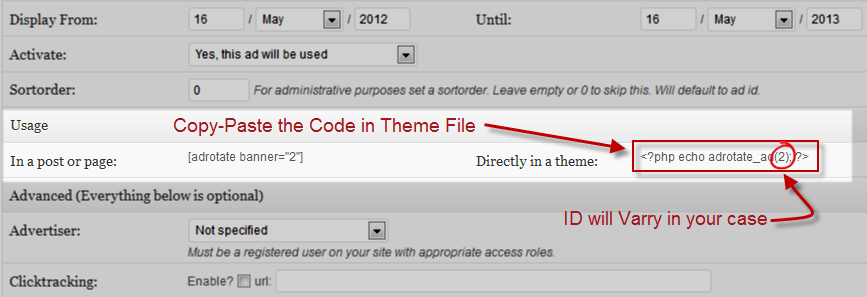
    Step3-2 Display Ad Using PHP Code
    Adrotate Ad unit PHP code
    • Copy the php code <?php echo adrotate_ad(#WILL VARY IN YOUR CASE#); ?>
    • Paste, the code in your theme layout file, for instance header.php or single.php as desired.
    • Save & upload file to server using FTP.

    We’re Done

    Now that you have added ad unit code in the theme, refresh webpage to preview the ad slot. Works fine ? Bravo, we are done with the tutorial.

    Not Working ‘eh ? Recheck the codes, make sure you have uploaded the right file and clear cache, in case you are using cache plugins. Go through the Step 2 & Step 3 again, till you see the ad unit live in action. 😉

    In this tutorial we learned about adding a new ad slot in WordPress Theme using Adrotate Plugin. If you have any queries or further assistance is required, post us your feedback using the comment form below.
  • How to Extend Contact Details of Author Profile in WordPress

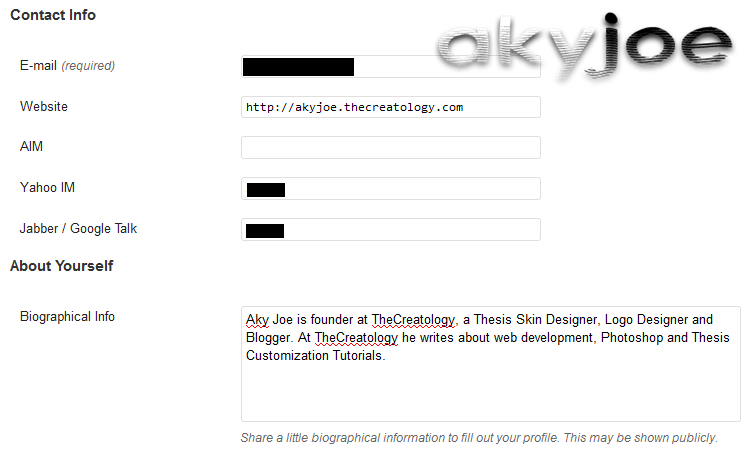
    Do you think WordPress has a user-friendly interface ? Of-course I do, not just because of its interface, but its ability to extend features to meet the required needs. For instance, in WordPress user profile editor under Contact Info section you can add E-mail, Website, AIM, Yahoo IM & Google Talk.

    wordpress admin default contact details
    Default Contact Options in WordPress

    WAIT! What if you need to add Twitter account in user profile or may be Facebook account in WordPress user profile ? Well, by default there is no space made by WordPress developers yet. I really wonder why do they ignore Twitter and Facebook or may be they don’t bother. Anyway, you don’t have to worry as WordPress is capable of extending its features, hence you can extend Contact Info of author profile. In this article, we will learn How to Extend Contact details of Author Profile in WordPress blog.

    Getting Started

    Before we start with the tutorial, I want you to make sure that your WordPress, Plugins and Theme are updated with latest versions. If you are using Thesis Theme then you can Safely upgrade to latest version Thesis.

    Add Contact Options in User Profile

    WordPress uses filters to override its default functions, and to extend WordPress Contact options it requires to create a filter. Find the code below and paste contact info filter in function.php file of the currently activated theme. If you are using Thesis Theme, then paste the code in custom_functions.php file. PHP code is as under:

    NOTE: Make sure you take full backup of functions.php file or custom_functions.php file using FTP before modifying the original file or you can also refer to the article about how to safely edit custom_functions.php.

    [php]
    /*
    * Author: Aky Joe
    * Edit Custom Author Fields
    */
    function extend_author_profile_joe( $joefields )
    {
    $joefields[‘twitter’] = ‘Twitter’;
    return $joefields;
    }
    add_filter(‘user_contactmethods’,’extend_author_profile_joe’,10,1);
    [/php]

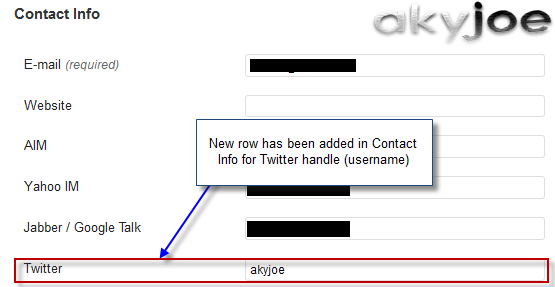
    Above code will add Twitter option field in user profile under Dashboard Admin. Once you have added the code, save the file and upload it to server using FTP. Navigate to Dashboard Admin > Users > Your Profile and look for Twitter under contact info, similar to the screenshot below:

    extend wordpress contact option twitter
    Twitter Option added in User Profile

    Embed Contact option in Theme

    In a WordPress blog, Contact Info options are often used in Single Posts, for instance in Author Bio, Bylines & etcetera. To show Contact Info option in Theme requires, a PHP code to be added within the Post Loop in Single.php. Thesis Theme users can refer to Add Author Bio below single post in Thesis WordPress Theme. PHP Code to embed contact option is as under:

    [php]
    < ?php the_author_meta( ‘twitter’ ); ?>
    [/php]

    Was that easy ?

    I hope it was and in similar fashion you can extend contact details in WordPress. You can play or innovate the above code to meet your requirements, like adding facebook account in user profile, custom image urls in user profile and so on.

    Can’t figure out a word above ? then you can also hire me to do extend Contact Options for WordPress. Else if you have any query or further assistance is required, post your feedback as a comment below.

  • Real Estate WordPress theme design for CBUS Properties

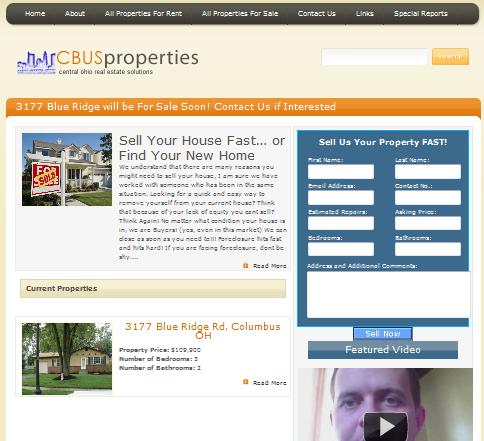
    CBUS Properties is a real estate investing company in Columbus, USA which is currently buying, repairing and selling/renting properties in the area. The founder of the company connected me via Twitter and wanted me to revamp the old website with latest web standard, using WordPress.

    Real estate websites design require a capability of displaying News Headline, featured box and a contact form. The custom wordpress theme was designed for CBUS Properties, which included all the features listed above for a real estate website. I used JavaScript method to develop and authenticate the custom contact form. The project took a week’s time to meet the client’s requirement and in no time, it was published too.

    Below you can see a screenshot for the CBUSProperties.com:

    CBUSProperties.com Screenshot
    Web design by TheCreatology

    You can also visit CBUSProperties.com here. If you like this work,  post comments as your feedback, or if you want something similar for your website, contact me below.

  • Website/Blog designed for Capital Striders

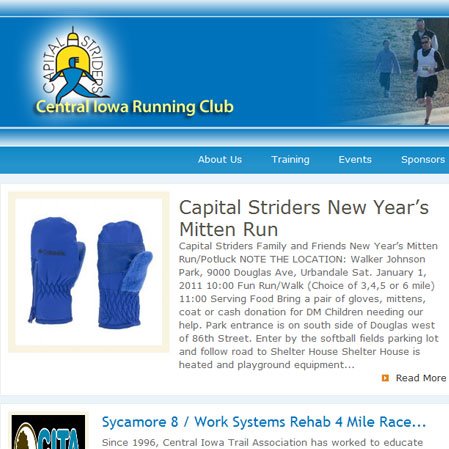
    CapitalStriders is a Central Iowa Running Club, which encourage  and promote running through the education of the community on the benefits of physical fitness and amateur sport. Website administrator connected me via twitter, and it was my first freelance web developing project, over the web.

    I took the challenge and designed a unique design for the running Club as per the brief.  WordPress custom theme was too developed in no-time, and soon was published. Client appreciated my work, and the feedback was my profit.

    Below is a screenshot of the website CapitalStriders:

    Web Design by TheCreatology

    You can also visit CapitalStriders. If you like this work,  post comments as your feedback, or if you want something similar for your website, contact me below.