Category: News

The News category keeps you up to date with key changes in the digital, web and technology sectors. It covers platform updates, feature launches, security alerts and industry shifts that affect websites and online businesses.

Instead of just listing headlines, articles explain what each change means, who it affects and what actions to take. Coverage includes WordPress, plugins, tools, performance updates and evolving web standards.

If staying current matters to your workflow, this category delivers timely, practical insight without unnecessary noise so you can act quickly and make informed decisions.

  • Start Online Business Idea – Create Good Web Designs in 2019

    Start Online Business Idea – Create Good Web Designs in 2019

    First of all, TheCreatology welcomes you & your loved ones, a Happy New Year 2019. Last year 2018 wasn’t too bad either, apart from blogging point of view, but we designed some awesome WordPress websites for the lovely clients. Experience of 10 years in digital field marketing, in contrast, envisions us to help you kick start online business idea.

    Our goal is to create web the best place for a targeted audience.

    What’s Upcoming in New Year 2019?

    New Year 2019 brings a new ideation to design better web. We’re more focused, therefore more thoughtful to articulate technology and its resources.

    Revamping This Website
    Website Loading Screen TheCreatology
    Website Loading Screen

    TheCreatology website revamp was long due and the wait is finally over. This time we have focused to achieve better readability of the content using eye-friendly web contrast colours.

    How to Start Online Business?

    We believe that simplicity of complex elements can achieve better and improved results. Therefore, we introduce you to our new approach to start business online.

    Web Design & Development Services

    Web Design Digital Branding Mobile App Development
    Web Design. Digital Branding. Mobile Development

    We are a one-shop for your digital needs. Certainly, Quick Website, Digital Branding, Business IT Consultation, or Mobile App Development solutions under one-roof. Also, we’re improving WordPress Squirrel Framework for robust web experience. Furthermore, it now supports Woocommerce plugin to start online shopping business platform.

    We offer more benefits with each service delivered. Most noteworthy are free on-page SEO for websites and one year of troubleshooting support.

    Web News & Updates

    We promise to share more digital marketing strategies. Also, web designs tips and WordPress development tutorials by means of blog. Even more, you may subscribe using the favourite social media icon below or a news feed to receive instant updates.

    Let’s Make Web a Better Place

    There are so many websites that are flagged out from Search Engines. Above all Google Search Engine tops that list in the digital world. Furthermore, to rank top on Google, is getting even harder as we speak or probably as you read. In spite of all tools provided by Google, why website can’t rank on top of Google? Because the website doesn’t meet standards which Web wants. And for fact Google’s basic idea is to make this web a better place.

    Here at TheCreatology, we also want to improve website’s health for search engines and compete with the world. For instance, a doctor improving the immune system of human body for better health. Similarly, we want to optimise your website for lead conversions. Develop minified and compressed code for faster web-page loading, so it’s efficient.

    Lastly, we hope to walk heads high with this approach and help you start business online. Happy New Year 2019!

  • WordPress Vulnerablity: Update Jetpack Plugin to 2.9.3 – ASAP!

    WordPress Vulnerablity: Update Jetpack Plugin to 2.9.3 – ASAP!

    A security breach detected in a commonly used plugin Jetpack, as a result makes the WordPress site vulnerable to hackers. However, this serious bug in Jetpack plugin, lets hacker to mess around with website database and gain full site access as well. Wake-Up!

    If you’re not aware of Jetpack plugin version, then contact your web administrators and ask them to update Jetpack plugin to 2.9.3 version it for you. If you choose to DIY, then:

    Update Jetpack Plugin from Dashboard

    1. Login to your WordPress Dashboard.
    2. Navigate to Dashboard > Plugins
    3. In the list of installed plugins, find Jetpack by WordPress.com and check the version number below it.
    4. If you’re using an older version < 2.9.3, then there shall be an update message below the plugin itself, saying “There is a new version of Jetpack by WordPress.com available. View version 2.9.3 details or update now.”
    5. Click on Update Now and it will redirect to update plugin page.
    6. Bravo! You’re safe now!

    For more details you can read WordPress News about Jetpack 2.9.3: Critical Security Update

  • WordPress 3.7 Brings Auto Update Feature Just Like Smartphones

    WordPress 3.7 Brings Auto Update Feature Just Like Smartphones

    WordPress 3.7, is next release by Automatic and they’ve nothing much to amaze, except few unnoticeable features. Well, one of the amazing feature is its ability to Auto Install WordPress Update just like your Smartphone. Isn’t that cool for the Lazy Admins? Haha…I’m just saying. Well, there are few more features which you will find later in this article on WordPress 3.7 Update Release.

    WordPress 3.7 with Auto Update Feature

    Features for Blogger / User

    There’s nothing much to amaze you guys, but there’s no harm in knowing some of the hidden features of WordPress 3.7. They’re listed below:

    • Automatic Background Updates: Explained below.
    • New Password Strength Meter: To overcome WordPress hacks, the password strength meter’s enhanced to avoid common mistakes. It recognizes the keyboard patterns, references, dates & names.
    • Enhanced WordPress Search: With the improved search your audience will get more relevant and efficient results now.

    Features for Developers

    • New filters added to control background updates.
    • New function to list all network sites
    • Fixed dashboard UI bugs & bad styling
    • New Classes for background updates, date queries etc.
    • New Functions introduced, like get_previous_post_link and get_next_post_link.
    • And read more here.

    How WordPress Background Update Works?

    The WordPress version 3.7 includes background updates feature. So, when a security or maintenance update’s released, the WordPress Background Update feature silently installs the new update available. This feature only functions for the minor updates, like Version 3.7.1 and doesn’t for the major updates, like Version 3.8. The reason is, a lot of Theme and Plugin dependencies may or may not fully support the major release and break your WordPress site layout.

    Is Upgrading to WP 3.7 Safe?

    WordPress 3.7 is absolutely a stable release, so you can upgrade from WordPress 3.6.1 to 3.7  fearlessly.

    Do let us know, if you face any bug while upgrading to WordPress 3.7, by posting a comment below.

  • New Thesis Update Service: Upgrade Old Thesis 1.x to New Thesis 2.x Theme

    Good News, TheCreatology now adds Upgrade to Thesis 2.0 in the service list, especially for people afraid of updating thesis. Using this service you will be able to restore previous Thesis 1.x design in new Thesis 2.x environment.

    But, before that you should understand why a WordPress website needs Thesis 2 update.

    Thesis 2 Theme Benefits

    No doubt thesis theme has always been a killer WordPress theme. Read below to know why you should upgrade to thesis 2:

    • Code Optimization: Each HTML,PHP & CSS code is efficiently complied and optimized for faster page loading.
    • No FTP: Design and customize skins using Thesis Skin editor.
    • No Coding: Ease of Dragging HTML structure & Built-in CSS Packages.
    • Doggie style: Missieur (Chris’s dog), tips you about SEO, broken links & 404 error pages.

    Wanna Upgrade to Thesis 2.0 Theme?

    It is a tricky process to update old thesis 1.x, but our team is ready to take that challenge. To get started:

    Upgrade to Thesis 2.0
    Upgrade to Thesis 2.0

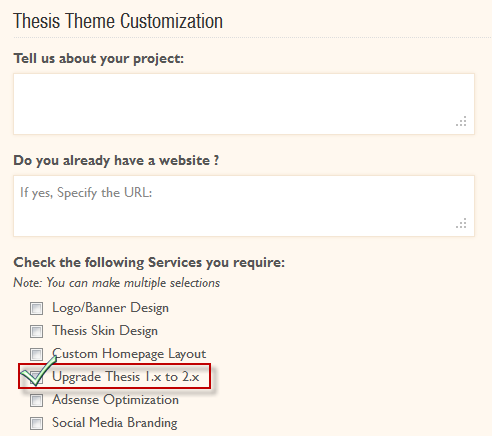
    • Select Customize Thesis image in yellow box and a Thesis Customization form will appear.
    • Fill in the required details and services you wish to select.
    • If you want to upgrade your old thesis theme, then select “Upgrade Thesis 1.x to 2.x” option and press Submit.

    Upgrade to Thesis 2 Service
    Upgrade to Thesis 2 Service

    • On receiving your inquiry and depending upon the requirement, it shall take us at least 6-18 hours to revert back.

    Why Hire TheCreatology?

    • We understand your concerns and high risks involved in the upgrade process.
    • Our team is testing Thesis 2.0 since day 1 and every project adds a new experience.
    • We are getting familiar to its new architecture and environment.
    • Till date, we have crafted 3 projects using Thesis 2 which will be added in our portfolio shortly.

    So, if you want to upgrade Thesis 2 without any pain, then consider us working on it.

    Confused? Feel free to Consult Us

    If you have questions then direct them to us by using contact form below or email on help [at] thecreatology [.] com

  • Jetpack 2.0 Post by Email: Quickly Publish Article on WordPress using Email

    Have you ever heard of Publishing article directly from email? Sounds crazy, ‘eh? Well, a new feature of Jetpack plugin, Post by Email, allows you to publish articles on WordPress Blog  just by sending email.

    Jetpack 2 Post by Email Feature
    Jetpack 2 Post by Email Feature

    WordPress Mobile App is limited only to IOS and Android supported devices. Whereas, with Post by Email feature, you can quickly post articles from any mobile device supporting email. Double benefit for smart phones!

    In this article, we will learn to Publish article by Email on WordPress blog.

    Jetpack 2: Post by Email Working Analogy

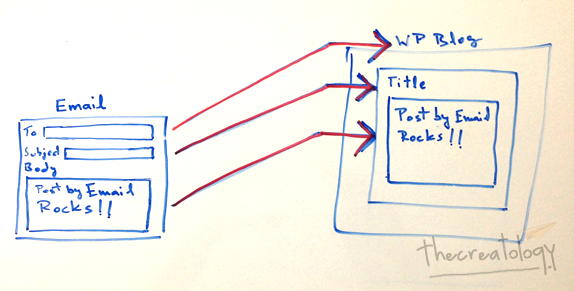
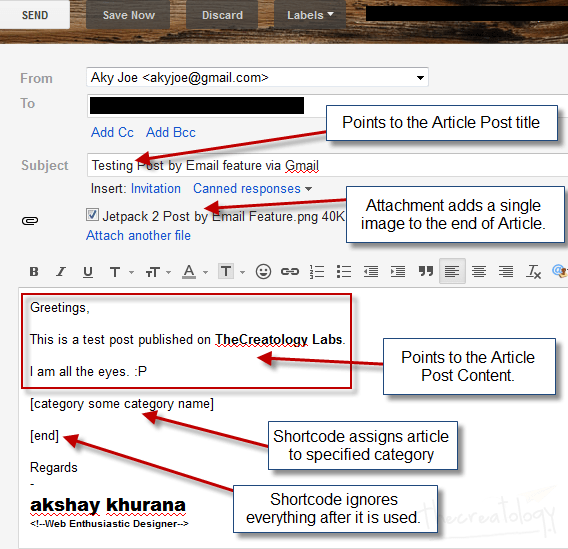
    Check the illustration explaining post by email feature working, below:

    Jetpack Post by Email Analogy
    Jetpack Post by Email feature working explained

    Above illustration explains the following:

    • To field containing Secret Email Address points to WordPress Blog
    • Subject field points to Title of WordPress Post
    • Body field points to Content of WordPress Post

    Generate Secret Email Address for Blog

    Secret email address bridges between Email client and WordPress blog. A special email address generates every time you enable Post by Email feature on your Blog. It is an unique email address and must be kept secret unless you want other people to publish articles on your blog.

    Below is procedure to generate secret email address:

    Note: Make sure you have enabled Post by Email feature under Jetpack Dashboard settings.

    • Navigate to Dashboard > Users > Your Profile.
    • Scroll down till you see Post by Email.

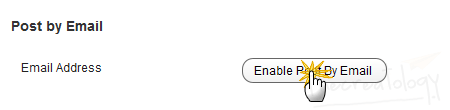
    Jetpack 2 Enable Post by Email Feature
    Enable Post by Email Feature

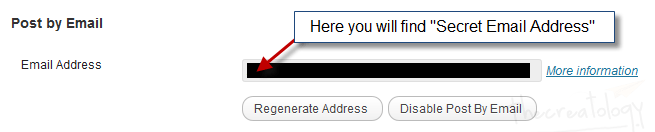
    • Click the Enable Post by Email button. Once done, you will see something similar to screenshot below.

    Jetpack 2 Secret Email Address
    Secret Email Address

    • Don’t disclose your Secret Email Address with anyone.
    • Whereas, if you experience any fraud then use Regenerate Address button or Disable Post by Email button.

    Compose Email to Post on WordPress

    Now that we have generated secret email address for blog, let’s get started. Check out the info graphic about writing an email to publish article on WordPress, below:

    Compose Email to Post on WordPress
    Compose Email to Post on WordPress

    Refer to Post by Email working analogy explained above. Also, there are some post formatting options and short-codes available here, for advanced blogging.

    Note: Make sure you proof-read before sending email, as there is no option to update post.

    Once done, send email to the secret email address.

    Post Published from Email

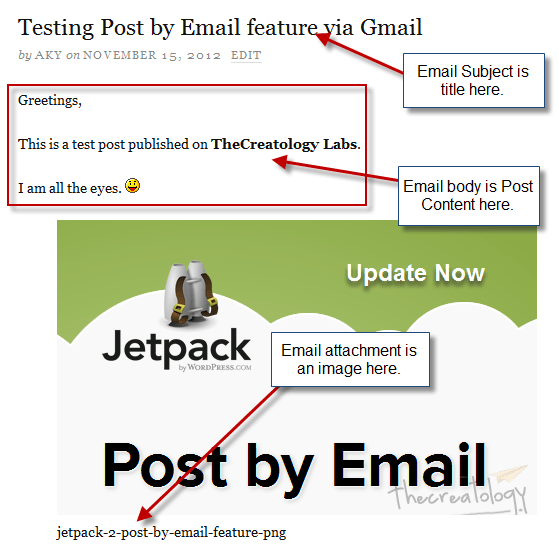
    Let’s see the post published via email on WordPress test site.

    Post Published by Email
    Post Published by Email

    Looks good!

    What else?

    Post by Email feature can be effective for bloggers covering news, live events and press conferences etc. They can draft email templates before hand to save more time for proof-reading content.

    What do you think about Jetpack Post by Email feature? Do let us know by posting a comment below.

  • No Post Sharing Hassle Now as Jetpack Plugin 2.0 Updates

    No need to copy/paste links on Social media sites as Jetpack Plugin 2.0 will do it for you. Few moments ago, Automatic team released 10th update of Jetpack plugin with next-generation features. Jetpack 2.0 Plugin can publicize to Facebook, Twitter etc. and also allows you to Post article on WordPress by Email. Some catchy features like Photon and Infinite Scroll are also packed with new Jetpack update.

    Jetpack Plugin 2.0 Update
    Jetpack Plugin 2.0 Update

    Jetpack 2.0 Features

    • Publicize on Facebook, Twitter, LinkedIn & Tumblr
    • Post by Email
    • Photon – Faster Image Caching
    • Infinite Scroll

    Auto Share Post on Social Media using Publicize Feature

    Jetpack 2.0 allows your to share content on Facebook, and other social media sites, as soon as you hit publish button. You don’t have to manually share links on Twitter or Facebook when WordPress Jetpack Plugin does it with ease.

    Enable Publicize Feature

    Make sure that Publicize Feature is enabled under Jetpack Dashboard.

    • Navigate to Dashboard > Settings > Sharing.

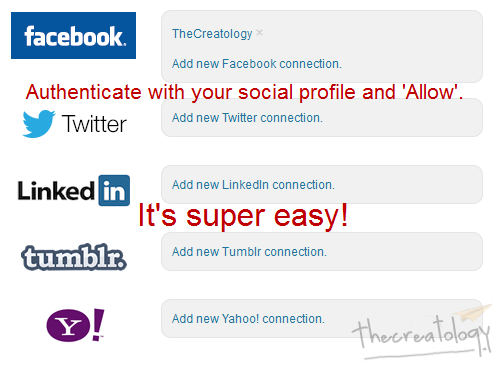
    Publicize using Jetpack 2
    Publicize using Jetpack 2

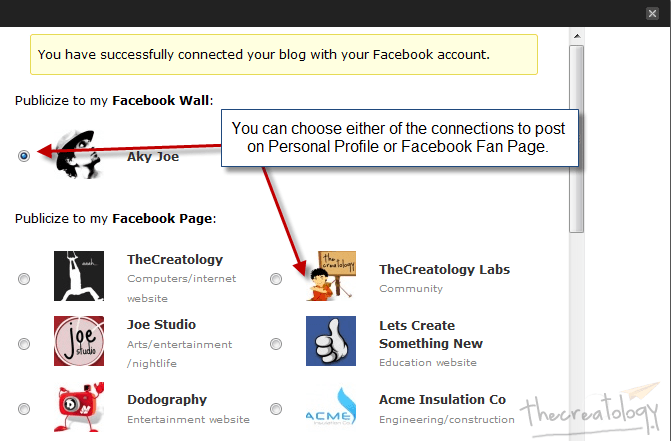
    • Choose your connection type and click on Add new connection. For Instance, we added a Facebook connection in the screenshot below:

    Publicize on Facebook using Jetpack 2
    Publicize on Facebook using Jetpack 2

    • Once done, click on the Ok button. Done?
    • Cool, we have a Facebook Connection now. You can try by adding more connections in similar fashion.

    Your Thoughts?

    Let us know, if Publicize to Facebook, Twitter, LinkedIn and Tumblr feature helpful or not.

  • Thesis 2.0 – Killer WordPress Theme Updates – Available for Download

    Its been a good morning so far, especially when you wake up with cool updates. One was my sister giving birth to a girl child and other coming from Chris Pearson, giving birth to Thesis 2.

    Phew, long time for Thesis fans ‘eh? Well your wait is over as Thesis 2.0 is available for download now.

    thesis-2-theme-download
    Download Thesis 2 Now!

    How to Download Thesis 2.0?

    No big deal seriously, but this blog is not just limited to geeks. Check below to get new Thesis theme update:

    • Login to DIYThemes.com using the credentials provided to you after purchase.
    • Next screen will be the Download Thesis page. Alternative, you can use the top navigation.
    • In the Downloads Page you will find two links, one for a Thesis Switcher Plugin and other to Download Thesis 2. (refer to screenshot)

    thesis-2-download-steps
    Steps to Download Thesis 2

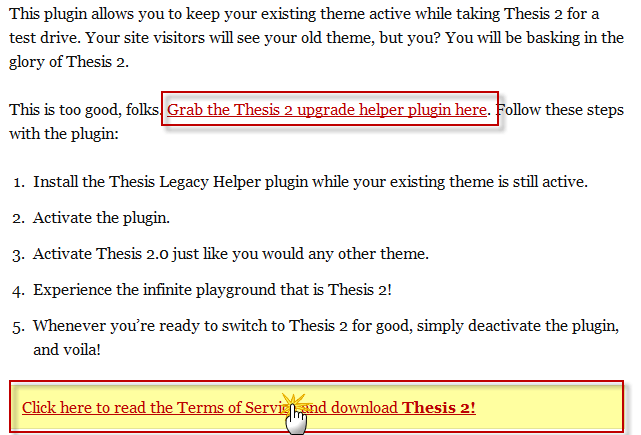
    • As mentioned, Switcher Plugin will help you preview new thesis theme, whereas your visitors will see the old theme. (Recommended).
    • Thesis 2 download comes with new set of terms & conditions and you have no choice but to accept it like an old Microsoft Windows screen. 😛
    • Accept TOS and Thesis 2 file downloading will start. (file size: 414kb; file type: .ZIP)

    Upgrade Thesis 1.x to Thesis 2

    We are still testing the new version of Thesis and a link to upgrade thesis 2 will appear here shortly.

    That’s all folks!

    What are you waiting for? Go and get new Thesis 2 power! Of course, you can come back here to share your views about Thesis 2.0 by posting a comment below.

  • Get Free Mobile WordPress Theme using JetPack Plugin 1.8.1 [Bug Fixed]

    Almost everybody is using smart phones and are surfing websites though that medium. But mobile phones have comparatively smaller resolution than a laptop or desktop computer screen and hence it either break a website layout or make it hard for user to zoom in and out. Unacceptable? Yes, indeed! But, if your website is running WordPress then Jetpack Plugin 1.8.1 update features a mobile optimized website.

    Jetpack PLugin Mobile Theme Update Now
    Mobile Theme: Jetpack Plugin 1.8 Update

    What’s New in Jetpack 1.8 Update?

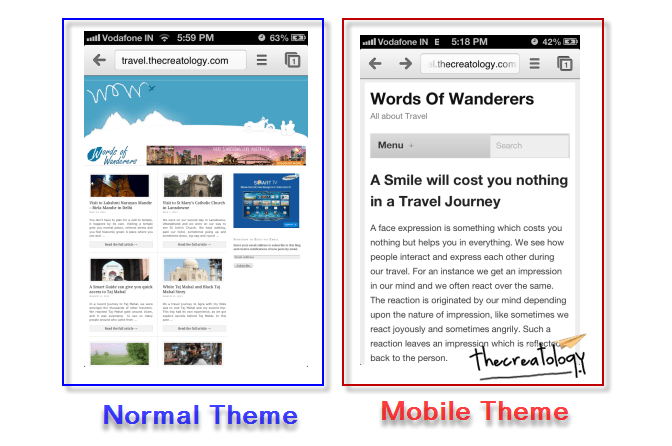
    Mobile Theme Jetpack plugin update proclaims to deliver better mobile browsing interface making content more readable with less cluttered layout. We tried testing this plugin update on a travel blog to see its effect. Well, we found it working fine and content looks neat and readable. Got a screenshot of the difference showing one with Normal WordPress and other having Jetpack enabled Mobile Theme. Check below:

    JetPack Mobile Theme Update Difference
    Jetpack Mobile Theme vs Normal WordPress Theme (IOS 6  | Chrome Browser)

    I hope that says it all.

    How to get Jetpack Mobile Theme Feature ?

    To get mobile theme feature on blog, you will have to install/update Jetpack plugin. Not sure about how to update Jetpack Plugin, follow this procedure below:

    • Login to WordPress Admin Panel and Navigate to Dashboard > Plugin.
    • Find Jetpack Plugin listed and click on Update Automatically link in orange.
    • You will get redirected to update plugin status page.
    • Done? Now navigate to Dashboard > Jetpack  and Activate Jetpack Mobile Theme Widget.

    Pros & Cons for Jetpack Mobile Theme

    Wondering if it is worth installing on WordPress Blog or not? Here is a list of Pros & Cons for you to figure out, read below:

    PROS FOR INSTALLING MOBILE THEME

    • Better readability on Mobile Devices.
    • Less Cluttered and 1-Column mobile layout
    • Option to toggle on/off mobile theme.
    • Option to show full post or excerpt post content.

    CONS FOR INSTALLING MOBILE THEME

    • Doesn’t work with custom page layouts.
    • No option to customize theme colors.
    • Menu Drop Button could have been better, as nobody will bother to click it.

    What do you think?

    Are you getting Jetpack Mobile theme? I believe it is worth a try, after all it comes with toggle option. 😉

    Share your thoughts about this New Jetpack Mobile Theme feature introduced with Plugin Update 1.8 and you can do so by posting a comment below.

  • Upgrade Thesis Theme to Kill WordPress 3.4 Image Caption Bug

    Upgrade Thesis Theme to Kill WordPress 3.4 Image Caption Bug

    Few days back, I mentioned about Image Caption Problem with WordPress 3.4 upgrade and about release of Thesis 1.8.5. Well, Chris Pearson, is a man of his words and has released a Bug Fix Version of Thesis Theme. According to Chris, this version has not only fixed image captions but has also resolved Multisite Installation bugs.

    Thesis 1-8-5 bug fix release
    Get Thesis Theme 1.8.5

    I figured that out myself, after upgrading to latest version of thesis theme and found all images boxes aligned properly, way they were before upgrading to WordPress 3.4. I did check the post markup, and it was neat, where all image captions were properly wrapped inside the div tags. Check out the screenshot for the same:

    Image Captions Fixed WordPress 3-4
    Image Captions Fixed (Click to Zoom)

    How to Upgrade Thesis Theme

    It’s recommended to keep your Thesis Theme updated to have maximum efficiency from your one-time investment. Follow this easy tutorial to Upgrade Thesis Theme.

    Thesis 1.8.5 Release Notes

    Check out, official release notes for Thesis 1.8.5, here.

    That’s it, ‘eh?

    Yes! Upgrading to Thesis Theme 1.8.5 will certainly resolve, image caption issue and all other problems with WordPress 3.4, hopefully.

    If you still have problems with Thesis or WordPress 3.4, then you can share them with us, by posting a comment below.

  • Image Caption Box Alignment Problem after WordPress 3.4 Update [With Thesis Fix]

    Images not aligning properly in article after upgrading to WordPress 3.4 ? If Not, then you are lucky and can skip this post. If Yes, then it is because of a recent WordPress 3.4 update which came out  few days back. Even, I got aware of this issue after posting an article earlier today, where I found all images aligned to left automatically with a broken caption box.

    Image Alignment in WordPress 3-4

    Though WordPress 3.4 Update has some nice improvements, but it has affected a lot of WordPress themes and frameworks. Here is what WordPress 3.4 Codex for image caption shortcode states… (important for developers)

    Change the image caption shortcode format to {caption shortcode}{anchor tag}{image tag}caption text + html{close anchor tag}{close caption shortcode} that way HTML tags in captions are better supported and the shortcode wouldn’t break when using the wrong quotes.

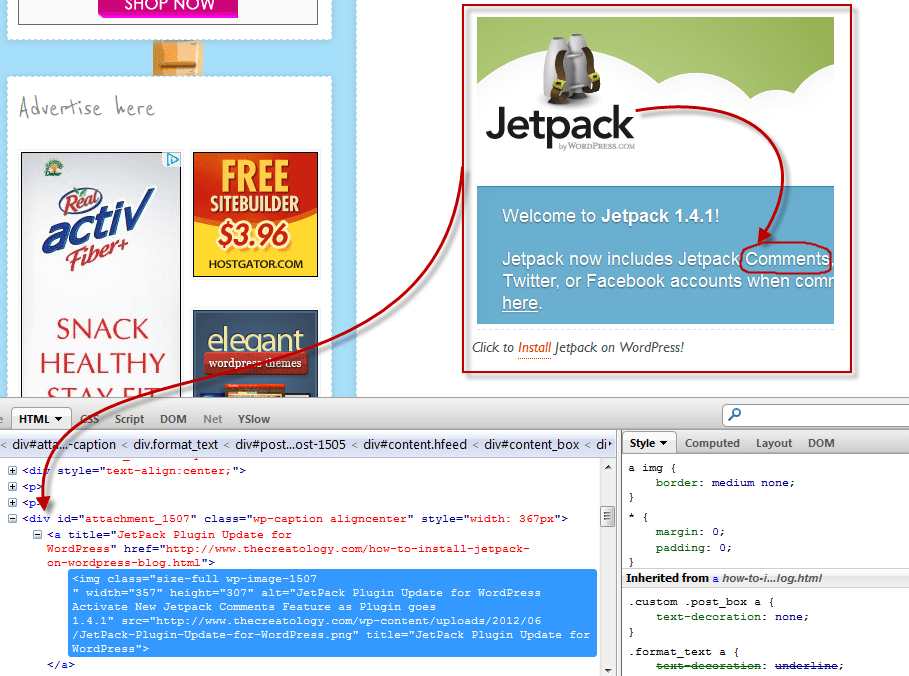
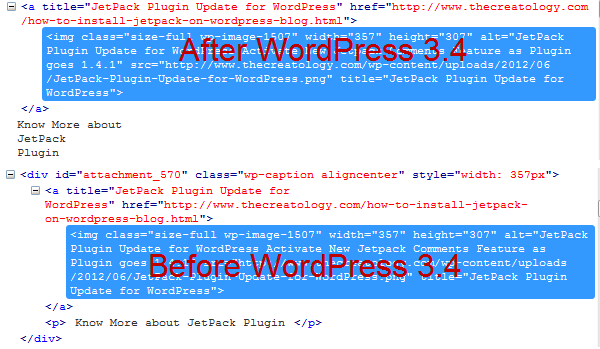
    When I saw markup in firebug, of a recently posted article after upgrading to WordPress 3.4, I found that image caption shortcode didn’t generate the div tag to form caption box. Check out the screenshot below:

    Markup Difference in WP 3-4
    Markup Difference in WordPress 3.4 Version

    Got the difference? Yes, the div tag is missing in after WordPress 3.4 clipping and hence breaking image caption box.

    How to fix Image Caption Issue

    There hasn’t been a proper solution to overcome image caption box issue, but you can:

    • Makes changes in Theme CSS file,
    • Manually add caption html tags or
    • Avoid usage of image caption shortcode

    Thesis Theme Users – Update to Thesis 1.8.5

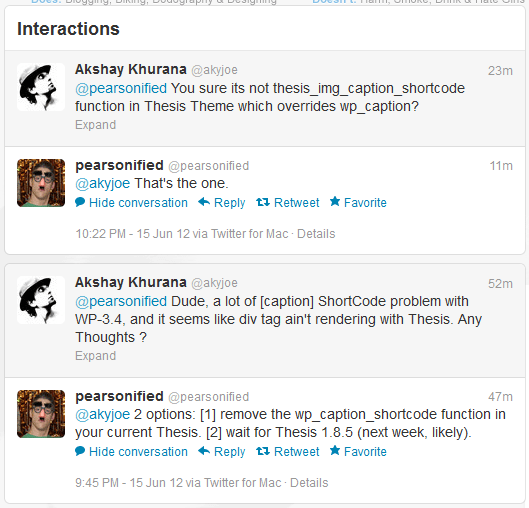
    An update for Thesis Theme will be available for its users by next week, as said by Chris Pearson. He has also suggested 2 options for Thesis users which you can check out in a Conversation with Chris on Twitter, in screenshot below:

    chat with chris thesis owner
    Interaction with Chris for Thesis Update

    I chose to wait for Thesis 1.8.5, as it’s not recommended to mess with Thesis core files.

    Thesis 1.8.5 is Available now ?

    Yes, new version of Thesis Theme is available for download now. Click here or the image below saying Thesis 1.8.5

    Thesis 1-8-5 bug fix release
    Get Thesis Theme 1.8.5

    (Post Updated on 19/06/2012)

    Whats next ?

    Have a similar problem with Image Caption Box Alignment after WordPress 3.4 Update ? Ask your theme developer now, for a fix. Whereas if you have a proper solution to it, then share it with us here, by posting a comment below.