Tag: WordPress

  • WordPress 6.9: Era of Effortless Collaboration for Content Teams

    WordPress 6.9: Era of Effortless Collaboration for Content Teams

    The wait is over—WordPress 6.9 arrived, that ushers in a transformative era for the globe’s leading content management system. Emphatically, the culminating major release of 2025, this version delivers groundbreaking features designed to revolutionise team collaboration, optimise content workflows, and strategically pave the way for advanced AI-powered experiences. This article focuses exclusively on the WordPress 6.9 Content features applied to content team’s contributions. Meanwhile, the Abilities API and related AI features will be covered in a forthcoming article.

    WordPress 6.9 Content Features: Phase 3 & Real-Time Collaboration

    WordPress 6.9 proudly ignites Phase 3 of the Gutenberg project, placing real-time and asynchronous collaboration at the very heart of the editing experience. Certainly leading this revolutionary shift is Notes, a transformative feature that redefines how content teams ideate, review, and refine together—seamlessly within the familiar WordPress environment.

    Notes in WordPress 6.9 – Block-Level Comments That Transform Teamwork

    Imagine Google Docs-style collaboration, basically now native to the Block Editor. Eventually with Notes, feedback lives exactly where it belongs—attached directly to the specific block under discussion. No more scattered Slack threads, email chains, or third-party tools.

    Standout capabilities include:

    • Precision targeting: Pin comments to individual blocks for crystal-clear context
    • Threaded discussions: Replies and reactions keep every conversation organized and actionable
    • Resolvable threads: Close the loop with one click once feedback is implemented
    • Instant email notifications: Authors stay in the know the moment new input arrives
    • Zero external dependencies: Collaboration happens entirely inside WordPress—no plugins, no logins, no context switching

    WordPress 6.9 Content features: Notes

    Enabled by default on Posts and Pages, Notes can be extended to any custom post type via a simple register_post_type argument. For editorial teams, agencies, enterprises with compliance workflows, or globally distributed creators, this is the frictionless collaboration layer the community has dreamed of since Phase 1.

    New Blocks in WordPress 6.9 Content Features: Reduce Plugins, Boost Creativity

    WordPress 6.9 ships with an arsenal of sophisticated new core blocks that eliminate plugin bloat while unlocking entirely new publishing scenarios:

    Accordion Block
    Natively create elegant, collapsible sections—ideal for FAQs, product specifications, or structuring long-form content. Built-in anchor support means you can deep-link straight to any panel.

    It posted a single photo of “before watering” and now has 2.3M followers demanding hydration tips, drip-proof selfies, and a merch line called “I Survived My Owner’s Schedule.” The plant refuses to appear in stories without a ring light.

    Evidence shows a sponsored diet tea left crumbs leading to a foodie influencer’s account. The caption read, “Oops, I ate the batch—#NotSponsored.” Followers demanded a recipe; the dog provided alibis. PR team released a statement: “Cookies consented.”

    Perfect for FAQs, secret recipes, or finally shutting up that one relative who asks the same question every Thanksgiving. Expand! Collapse! Feel the power! Your visitors will think you’re organised. You’ll know you’re just really good at hide-and-seek.

    It started posting wake-up routines and now charges per snooze. Brand deals include “Sleep Shame” and a pillow that unfollows you for bad mornings. Followers vote on its morning playlist — currently dominated by passive-aggressive pop.


    Math Block
    Render beautiful mathematical notation using industry-standard LaTeX syntax. From research papers to educational resources and technical documentation, academic and scientific publishing finally feels at home in WordPress—both as standalone equations and inline expressions.

    C=client emails2soul remainingC = \frac{\text{client emails}^2}{\text{soul remaining}}
    t=3days+kmscreamingt = 3\,\text{days} + \sqrt{kmscreaming}
    P=16.9×10420(nice)P = \frac{1}{6.9 \times 10^{420}} \quad \text{(nice)}

    Time-to-Read Block
    Automatically calculate and display estimated reading time, giving visitors instant context and boosting on-page engagement metrics.

    5–8 minutes

    Terms Query Block
    Dynamically list taxonomy terms with full design control—empowering theme authors to craft smarter archives, faceted navigation, and content discovery experiences.


    Comment Count & Comment Link Blocks
    Granular comment controls are now first-class blocks, letting designers place and style comment triggers exactly where they make the most impact.


    Stretchy Text (Fit Text)
    Paragraph and Heading blocks gain a breathtaking “Fit Text” option that automatically scales typography to fill its container. Achieve magazine-style responsive headlines and hero text that adapt flawlessly across breakpoints—no custom CSS required.

    Loading motivation……………(0%)

    By visiting this website you agree to give us your Netflix password, all future tax refunds until 2077, and the last slice of pizza in your fridge right now. 😀


    Top WordPress 6.9 Content Features for Faster, Smarter Workflows

    Direct Drag-and-Drop
    Say goodbye to tiny drag handles. Click anywhere on a block and move it effortlessly—the editor now truly behaves like a professional page builder.

    WordPress 6.9 Content features: Drag-n-drop

    Hide Blocks from Frontend
    A game-changing visibility toggle lets you conceal blocks during live viewing while keeping them fully editable. Perfect for:

    • Pre-scheduling seasonal promotions
    • Drafting major updates without duplicating pages
    • A/B testing layouts safely
    • Temporarily pausing content without permanent deletion

    Future releases will evolve this into sophisticated conditional display rules based on device, user role, geography, and more.

    Expanded Command Palette
    The lightning-fast Command Palette (Ctrl/⌘ + K) is no longer limited to the Site Editor—it’s now available dashboard-wide. Jump to any admin screen, create content, or execute actions in a fraction of the usual clicks.
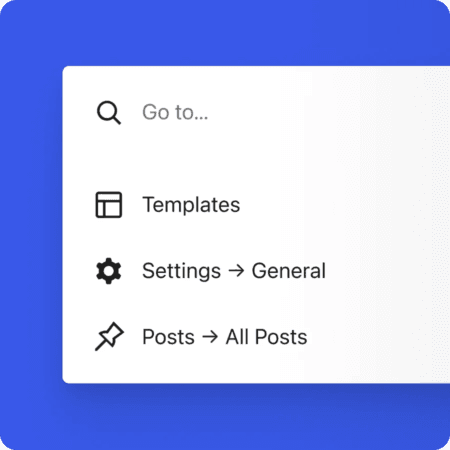
    WordPress 6.9 Content features: Command palette

    Simplified Site Editor
    A new streamlined mode delivers quick content-focused editing for marketers and writers, while preserving unrestricted creative power for designers and developers. The best of both worlds, without compromise.

    Smarter Template Management
    Complex multisite and multi-template workflows become intuitive. The revolutionary Allowed Blocks interface moves block restriction rules from PHP filters into a clean visual UI—empowering administrators to enforce brand and security standards without writing a single line of code.

    WordPress 6.9 isn’t just an update—it’s the foundation of a bolder, more collaborative future. Phase 3 has officially begun, and the possibilities for teams, creators, and publishers have never been more exciting. Welcome to the new era of effortless collaboration.

    What’s Cooking After 6.9?

    WordPress 6.9 is the kind of release that makes you smile and get back to work—because everything just feels better.

    Collaboration has just advanced in the most human way possible. Notes bring the warmth of sticky notes into the digital workspace, allowing teams to leave feedback that remains perfectly in sync, regardless of how many people are drafting simultaneously. It’s simple, delightful, and already saving hours on every multi-author site I’ve worked on. Phase 3 is no longer “coming someday”—it’s unfolding beautifully, one thoughtful feature at a time.

    And the editor? WordPress 7.0 will finally complete the full iframe-free transition, meaning the Site Editor and post canvas will look and behave exactly like your front end. Years of quirky stylesheet conflicts and “it works on the front end but not in the editor” frustration are gently retiring. This is WordPress keeping its promise that what you see while editing is what your visitors will see—pixel-perfect, every time.

    The Part That Actually Matters

    This release is pure joy in motion.

    • Notes make team workflows friendly again.
    • The new Layout Grid and improved Cover blocks enable richer designs with fewer plugins.
    • Performance gains make every site feel snappier.
    • Site Editor improvements are so smooth you’ll enjoy using them.
    • WordPress 6.9 isn’t chasing trends. It’s listening to creators, developers, agencies and site owners — then delivering precisely what was requested, polished and ready.
    • This is the platform at its best: mature, confident and still genuinely excited to improve your day.

    Update when you’re ready — you’ll love it. WordPress isn’t just keeping up with the future; it’s building the future we want to live in — one joyful, practical release at a time.
  • New Jetpack Statistics: Paid for Commercial Sites – Downsides and Alternatives

    New Jetpack Statistics: Paid for Commercial Sites – Downsides and Alternatives

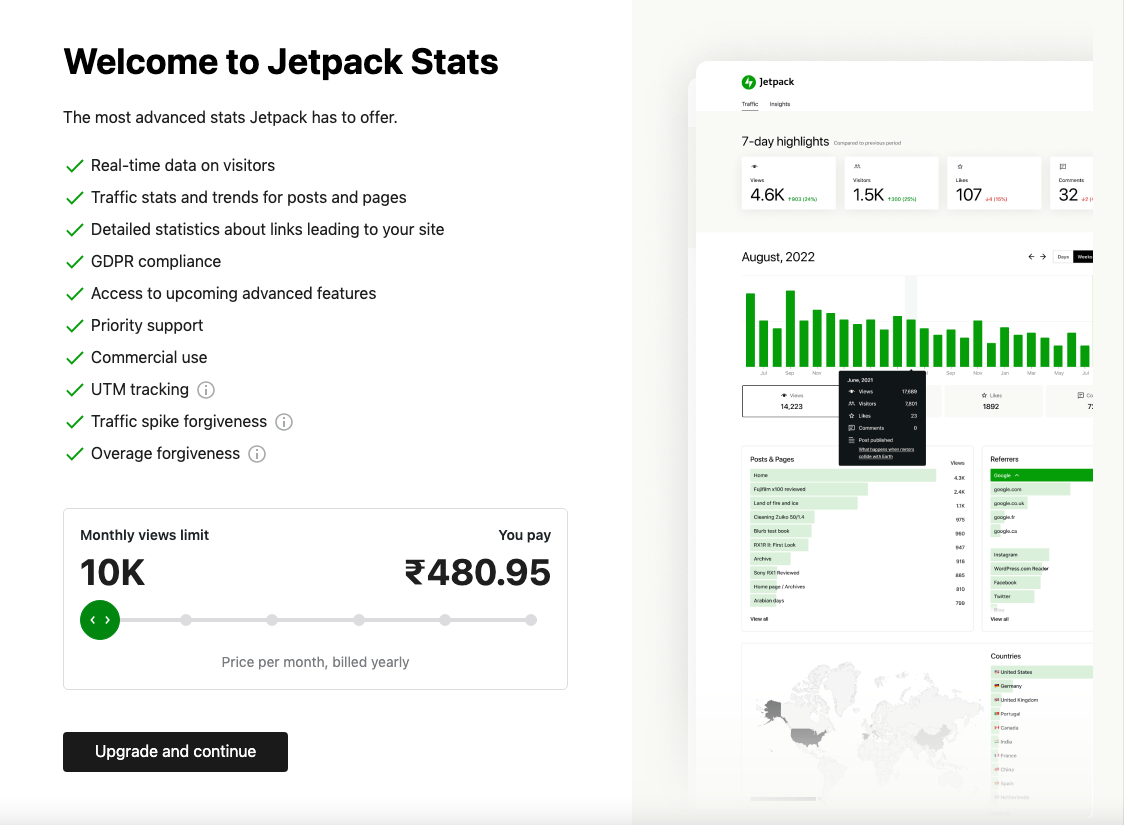
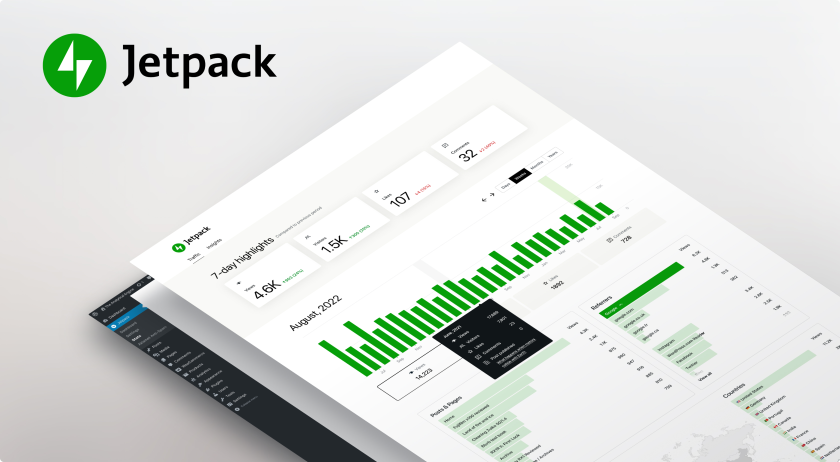
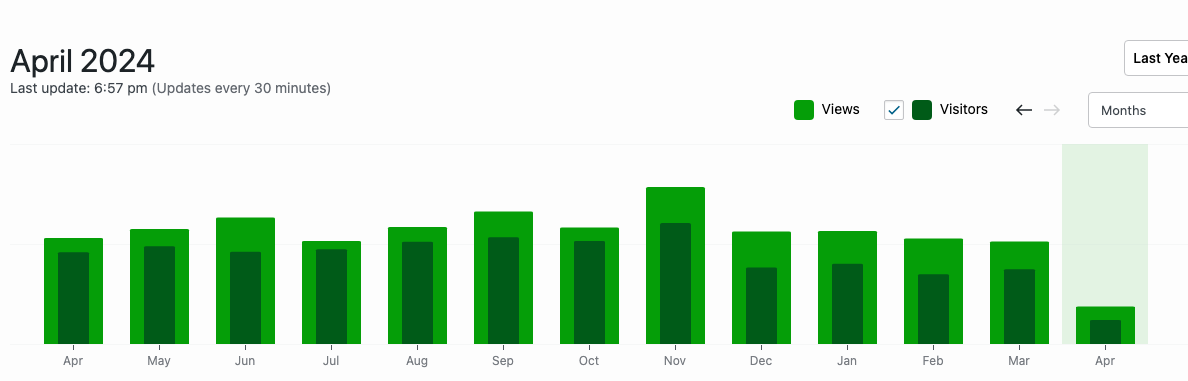
    Jetpack is a popular WordPress plugin that offers a wide range of features to enhance the functionality and performance of your website. One of the features that Jetpack offers is its Stats module, which provides valuable insights into the traffic and engagement on your site. Today, it’s forced to a Paid Only feature for all the Commercial Sites, most commonly the e-Commerce platforms, service providers or any potential site that is generating revenues. Technically, if your website can escape their algorithm that is intent to “Making Money from a WordPress Site” then its a Personal Site Stats & FREE forever (that too only time will tell).

    Let’s quickly check the downsides and alternative to Jetpack Statistics feature.

    Downsides of the New Jetpack Statistics

    While the free version of Jetpack Stats can be useful, the paid feature comes with its own set of downsides that are worth considering.

    Limited Data and Insights

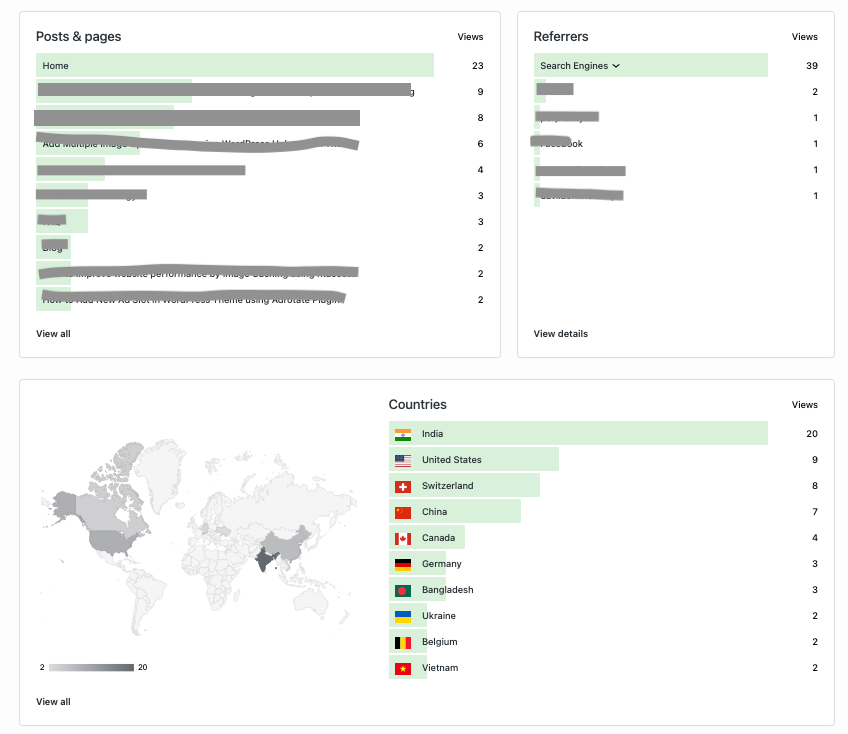
    One of the main criticisms of the Jetpack Stats paid feature is its limited data and insights. While the free version provides basic information about your site’s traffic, the paid feature offers more detailed analytics and metrics. However, these insights are still not as comprehensive as those provided by dedicated analytics tools like Google Analytics and Microsoft Clarity.

    With the Jetpack Stats paid feature, you may find yourself missing out on important data points that could help you make informed decisions about your website. For example, you may not have access to detailed demographic information about your visitors or the ability to track specific user actions on your site. Or if you need a detailed segmented report of organic traffic vs the demographic region & technology.

    Costly Subscription Model

    Another drawback of the Jetpack Stats paid feature is its costly subscription model. While the free version of Jetpack is available to all WordPress users, the paid features, including the Stats module, require a monthly or yearly subscription. This can be a significant expense for individuals or small businesses with limited budgets.

    Furthermore, the cost of the Jetpack Stats paid feature may not be justified for many website owners. As mentioned earlier, there are other analytics tools available, such as Google Analytics, that offer more comprehensive features and insights for free. Paying for the Jetpack Stats feature may not be a wise investment when there are better alternatives available at no cost.

    Lack of Customisation Options

    One of the limitations of the Jetpack Stats paid feature is the lack of customisation options. While the module provides some basic insights, it may not allow you to tailor the data to your specific needs. This can be frustrating for website owners who want to track and analyse specific metrics that are relevant to their business or industry.

    Additionally, the Jetpack Stats paid feature may not integrate seamlessly with other analytics tools or plugins that you may be using. This lack of compatibility can make it difficult to get a complete picture of your website’s performance and may require additional time and effort to manually consolidate data from different sources.

    Alternatives to Jetpack Stats

    While Jetpack is a popular plugin with many useful features, the paid version of its Stats module has its downsides. The limited data and insights, costly subscription model, and lack of customisation options make it a less attractive option compared to other analytics tools available in the market.

    Before deciding to invest in the Jetpack Stats paid feature, it is recommended to explore other alternatives and evaluate their features, cost-effectiveness, and compatibility with your website. It’s important to choose an analytics solution that provides comprehensive insights and meets your specific needs without putting a strain on your budget.

    Google Analytics & Site Kit by Google (Recommended)

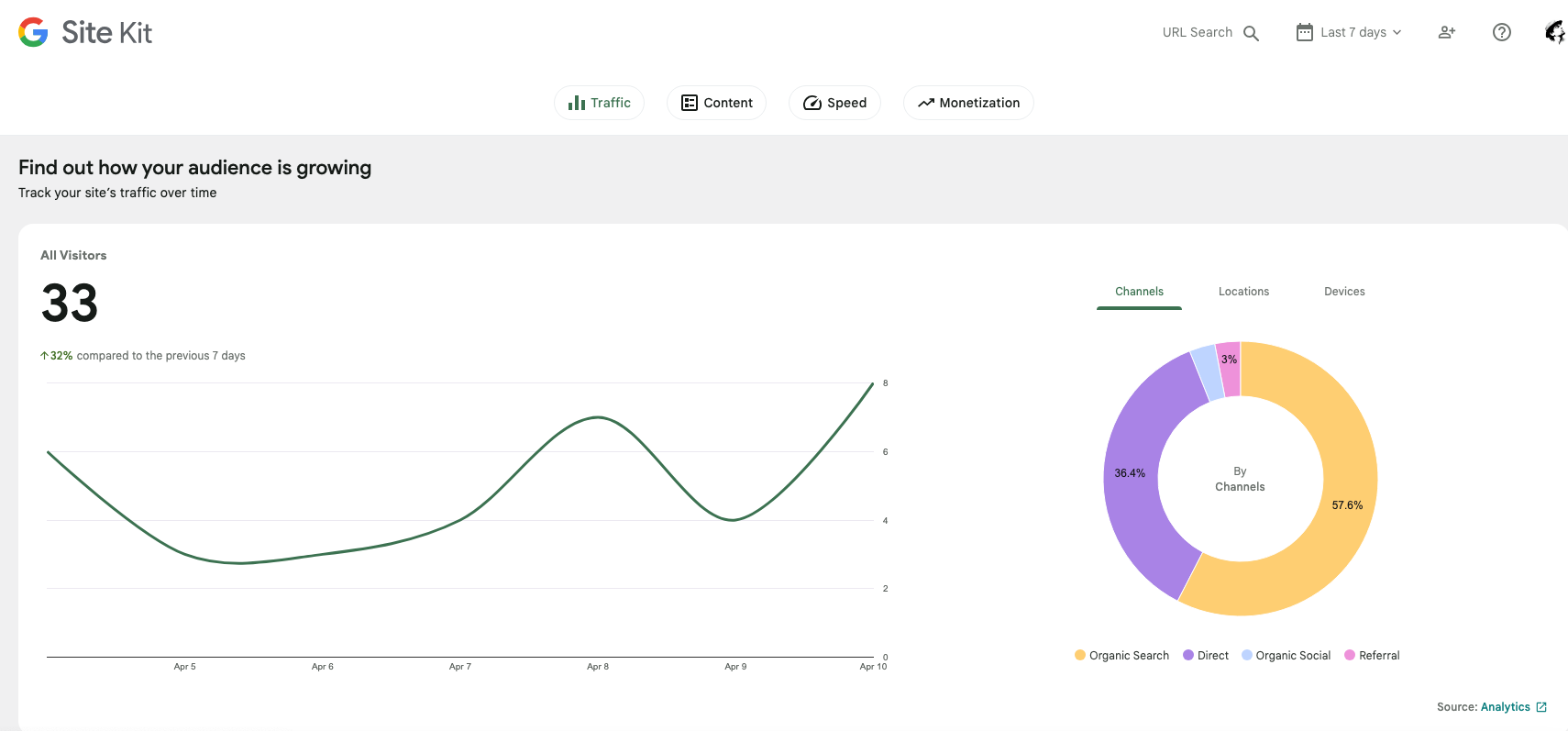
    Site Kit by Google is a WordPress plugin that provides insights from various Google services directly in your WordPress dashboard. It seamlessly integrates with the services like Google Analytics, Search Console, AdSense, and PageSpeed Insights, offering website owners a comprehensive overview of their site’s performance, audience behaviour, revenue generation, and SEO insights.

    We have already recommended most of our clients that are having issues with Jetpack Stats subscription model and do not wish to pay heavy subscriptions. This is the best alternative along with enough website statistical information.

    Criticism over Jetpack Stats

    Jetpack is bloatware, f**k them. If you analyse a basic WordPress site and one with jetpack, like a static comparison you will see a huge difference on how they behave and much resources the jetpack one eats up (ram/cpu).

    Ah yeah, you will be back soon. Everything out there nowadays are paid and subscription stuffs.

    At least Hello Dolly is still free. The day they start charging for it is the day I’m leaving WP.

    That’s pretty much it. In case you have any questions to ask, do leave a comment below.

  • WordPress 5.5 Updates with Sitemap, Speed, Security & New Block Editor Patterns

    WordPress 5.5 Updates with Sitemap, Speed, Security & New Block Editor Patterns

    WordPress 5.5 updates released yesterday, 11th August 2020, is in the honour of Billy Eckstine. This updates acknowledges the 4Ss, that is Simple, Speed, Security & Search. Loading speed and cyber security are the major factors that concerns most of us when we think of launching a WordPress site. But this WordPress update 5.5 could be a game changer. Yes, a well optimised WordPress website does not require expensive server resources or premium website hosting like Siteground.

    WordPress 5.5 Features

    PageSpeed Optimisation with Lazy Load

    50-70% of a page size depends upon the media like images, videos or fonts. The WordPress update takes care of image using the lazy load. When the viewport paints in the browser, the lazy feature loads the image. This feature is already available in Jetpack Plugin, but WordPress claims to have it added by default in the self-hosted solution. Very caring of Automatic!

    Inbuilt Sitemaps for SEO

    WordPress finally adds in-built Sitemaps to help a website appear in Search engines, the moment you publish them. It’s funny to believe that after a decade, finally WordPress has a default XML Sitemap that helps the search engine crawlers to discover posts and pages on the website.

    Automatic Updates for WordPress Themes & Plugins

    WordPress 5.5 Update | Auto Update Plugins
    WordPress 5.5 Features Auto Update Plugins

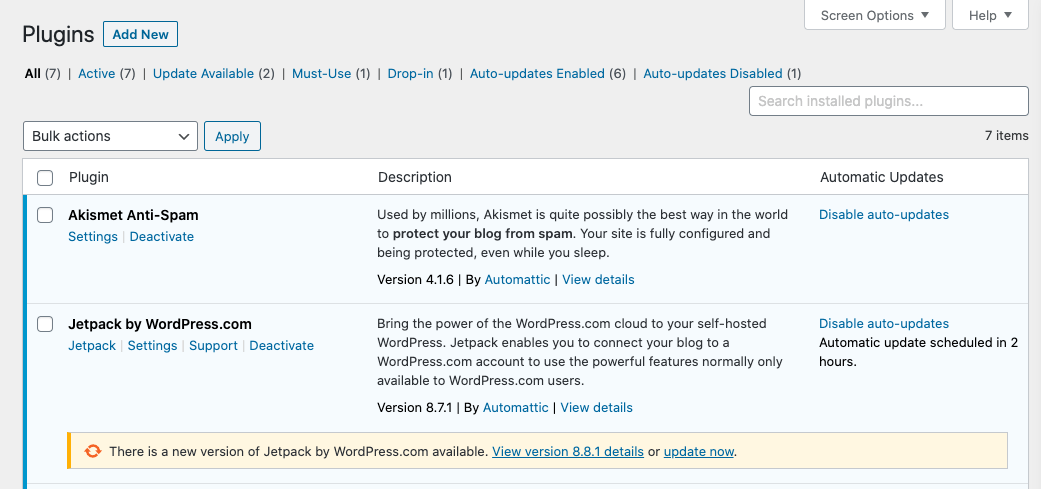
    WordPress 5.5 feature adds a new column in plugin list, as Automatic Updates. So, with a press of a button to enable auto-updates, schedules a cron job after 2 hours. If you’re already using this feature from WordPress.com Manage Sites, then the same setting should apply in the dashboard.

    New Block Editor with Patterns

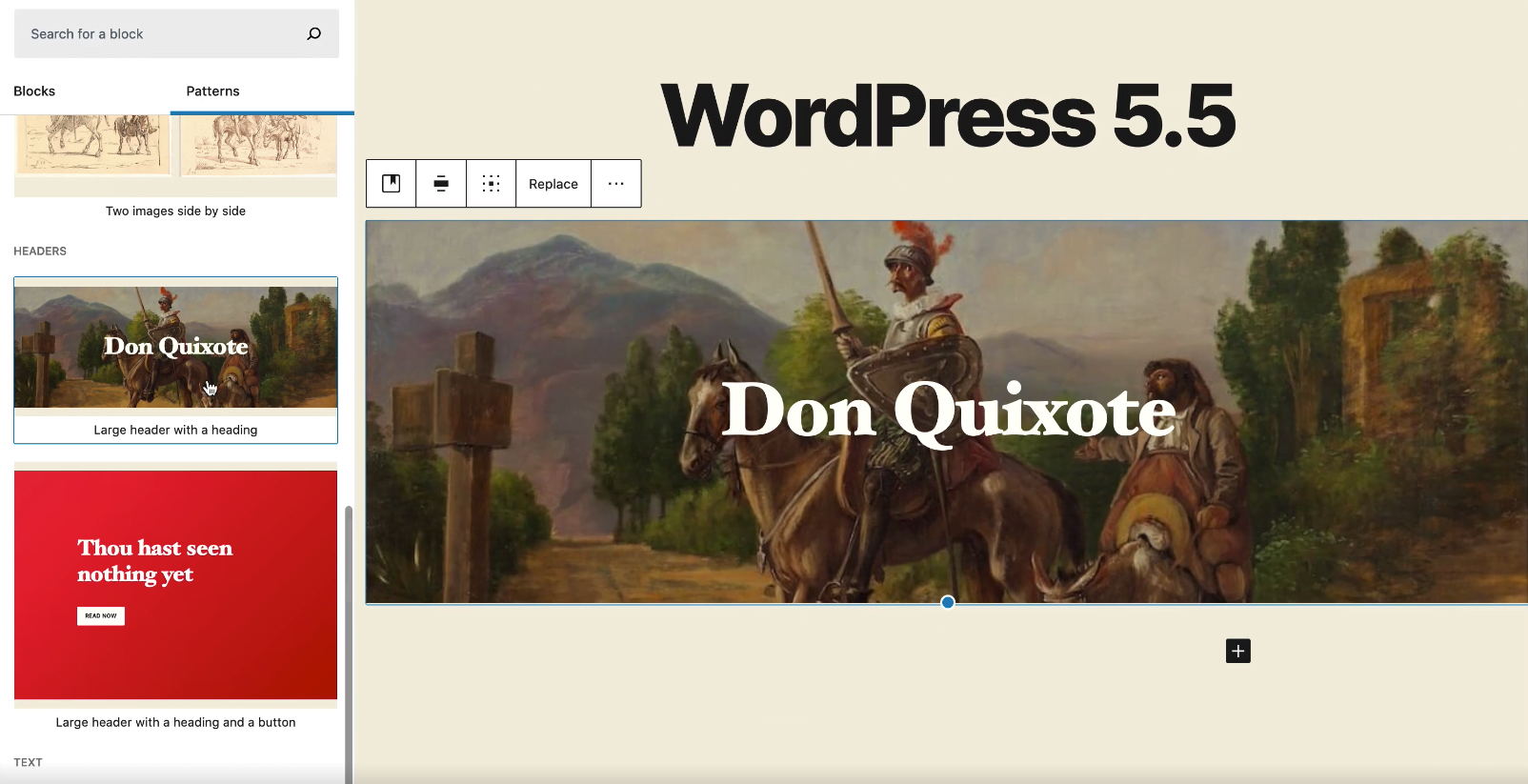
    WordPress 5.5 Block Editor Patterns

    A new block directory is available on the left top corner. New block editor patterns are comprises of useful and trending layouts for your webpage. For instance, a pattern called “Large Header with a heading” adds a full width image along with a heading. Therefore, such patterns reduces block handling complexity and increases productivity. WordPress wants 100% focus on the content not blocks. 😉

    New Image Compare Block

    A new block Image Compare Block, which is neat way to compare before | after images using a slider.

    Quickly Add Block in Post Editor

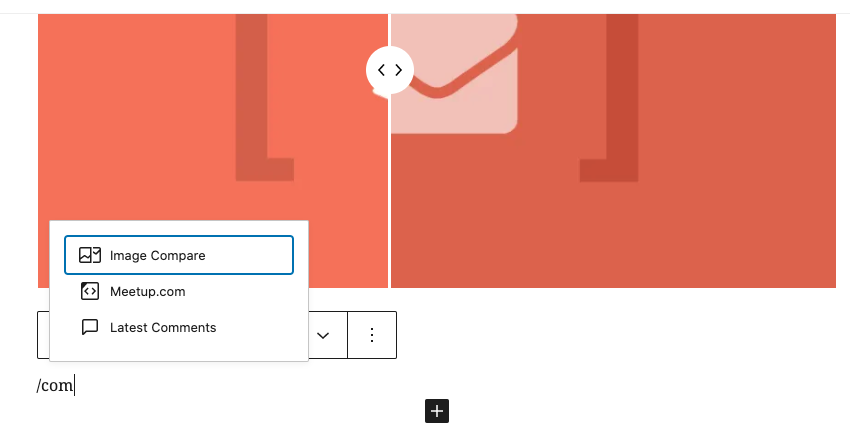
    Shortcut to Quickly Add Block

    Type forward slash “/” in an empty block, which further opens a list of available block to add. Just made it simpler!

    Edit Inline Image Block

    WordPress update adds inline image editing features. That means you can crop or edit the image without leaving the post editor interface in dashboard. Saves a lot of steps and increase productivity without compromising the quality.

    Features for Developers

    • Server-side registered blocks in the REST API
    • Dashicons Library updated with 39 Block Icons and 29 other icons
    • Passing data to template files
    • PHPMailer library updated to 6.1.6
    • And read more here

    Is Upgrading to WordPress version 5.5 Safe?


    WordPress 5.5 acknowledges to improve page speed score for performance, better user interface and visibility to rank on search engines. It is absolutely a stable release, so you can upgrade from WordPress 5.x to 5.5 fearlessly.

    Do let us know, in case you find any bugs when upgrading to WordPress 5.5 by posting a comment below.

  • WordPress 3.7 Brings Auto Update Feature Just Like Smartphones

    WordPress 3.7 Brings Auto Update Feature Just Like Smartphones

    WordPress 3.7, is next release by Automatic and they’ve nothing much to amaze, except few unnoticeable features. Well, one of the amazing feature is its ability to Auto Install WordPress Update just like your Smartphone. Isn’t that cool for the Lazy Admins? Haha…I’m just saying. Well, there are few more features which you will find later in this article on WordPress 3.7 Update Release.

    WordPress 3.7 with Auto Update Feature

    Features for Blogger / User

    There’s nothing much to amaze you guys, but there’s no harm in knowing some of the hidden features of WordPress 3.7. They’re listed below:

    • Automatic Background Updates: Explained below.
    • New Password Strength Meter: To overcome WordPress hacks, the password strength meter’s enhanced to avoid common mistakes. It recognizes the keyboard patterns, references, dates & names.
    • Enhanced WordPress Search: With the improved search your audience will get more relevant and efficient results now.

    Features for Developers

    • New filters added to control background updates.
    • New function to list all network sites
    • Fixed dashboard UI bugs & bad styling
    • New Classes for background updates, date queries etc.
    • New Functions introduced, like get_previous_post_link and get_next_post_link.
    • And read more here.

    How WordPress Background Update Works?

    The WordPress version 3.7 includes background updates feature. So, when a security or maintenance update’s released, the WordPress Background Update feature silently installs the new update available. This feature only functions for the minor updates, like Version 3.7.1 and doesn’t for the major updates, like Version 3.8. The reason is, a lot of Theme and Plugin dependencies may or may not fully support the major release and break your WordPress site layout.

    Is Upgrading to WP 3.7 Safe?

    WordPress 3.7 is absolutely a stable release, so you can upgrade from WordPress 3.6.1 to 3.7  fearlessly.

    Do let us know, if you face any bug while upgrading to WordPress 3.7, by posting a comment below.

  • WordPress 3.6 Version “Oscar” Launched for Power Users

    WordPress 3.6 Version “Oscar” Launched for Power Users

    A much awaited version of WordPress 3.6 “Oscar” is finally out of the jingle box. It is a stable release, especially for the Power Users, with a mobile responsive theme Twenty Thirteen and Revision History Engine. WordPress also claims to save post revision history, for each post-type, over 150 years only if you can survive up to that. LOL!

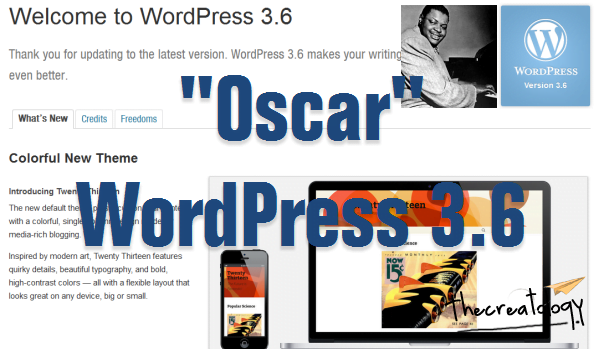
    Oscar WordPress 3.6 Version
    WordPress 3.6 Version “Oscar”

    Why WordPress 3.6 Oscar ?

    According to WP-Team, the version 3.6 is named after a great Jazz Pianist from Canada, Oscar Peterson.

    Features for Blogger / User

    There are no hidden features in WordPress 3.6, but here is a quick view below:

    • New Twenty Thirteen theme: To advance your level of Blogging, a new mobile optimized theme included is awesome. Twenty thirteen theme is a responsive and HTML5 friendly.
    • Revision History Engine: Revisions History Engine reconstructed to maximize its benefits for power bloggers. You can easily compare WordPress post revisions with a timeline slider.
    • WP-Embed Music shortcode: Easily embed music over Spotify & Rdio with new short-codes

    .

  • WP-HTML5 Media Player: A new html5 media player introduced for better cross browser stability and for your audio/video embeds.
  • WP-Menu New UI: New admin menu UI, lets you select the menu from drop down list and manage it. This is quite simple and much organized than the conventional tabbed one.
  • Features for Developers

    • New filters included for better extensibility.
    • External libraries updated  like jQuery, jQuery UI, Backbone etc.
    • Improved HTML5 markup for default comment forms, search forms and comment lists.
    • New Media API included to extract ID3 tags from music and video files.

    There are many more uncovered features in this version, important for your website or your client’s project development. So, stay tuned for more articles on WordPress 3.6 development.

    Is Upgrading to WP 3.6 Safe?

    WordPress 3.6 is a stable release, hence upgrading to WordPress 3.6 is absolutely safe. If you’re cooking something beyond the recipes of WordPress, then you might experience tasteless & sour layouts. 😛

    Did you update WordPress, yet? If Yes, how is the experience so far? If No, what are you wondering about WordPress 3.6? Do let us know by posting a comment below.

  • Image Caption Box Alignment Problem after WordPress 3.4 Update [With Thesis Fix]

    Images not aligning properly in article after upgrading to WordPress 3.4 ? If Not, then you are lucky and can skip this post. If Yes, then it is because of a recent WordPress 3.4 update which came out  few days back. Even, I got aware of this issue after posting an article earlier today, where I found all images aligned to left automatically with a broken caption box.

    Image Alignment in WordPress 3-4

    Though WordPress 3.4 Update has some nice improvements, but it has affected a lot of WordPress themes and frameworks. Here is what WordPress 3.4 Codex for image caption shortcode states… (important for developers)

    Change the image caption shortcode format to {caption shortcode}{anchor tag}{image tag}caption text + html{close anchor tag}{close caption shortcode} that way HTML tags in captions are better supported and the shortcode wouldn’t break when using the wrong quotes.

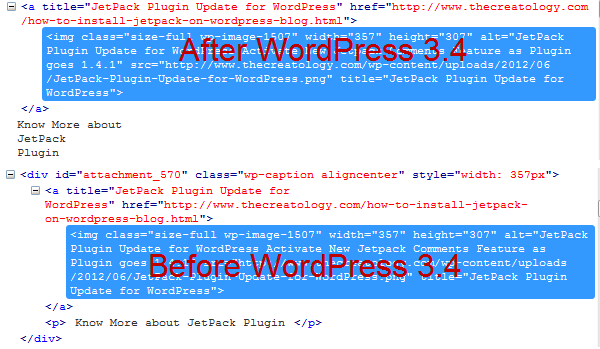
    When I saw markup in firebug, of a recently posted article after upgrading to WordPress 3.4, I found that image caption shortcode didn’t generate the div tag to form caption box. Check out the screenshot below:

    Markup Difference in WP 3-4
    Markup Difference in WordPress 3.4 Version

    Got the difference? Yes, the div tag is missing in after WordPress 3.4 clipping and hence breaking image caption box.

    How to fix Image Caption Issue

    There hasn’t been a proper solution to overcome image caption box issue, but you can:

    • Makes changes in Theme CSS file,
    • Manually add caption html tags or
    • Avoid usage of image caption shortcode

    Thesis Theme Users – Update to Thesis 1.8.5

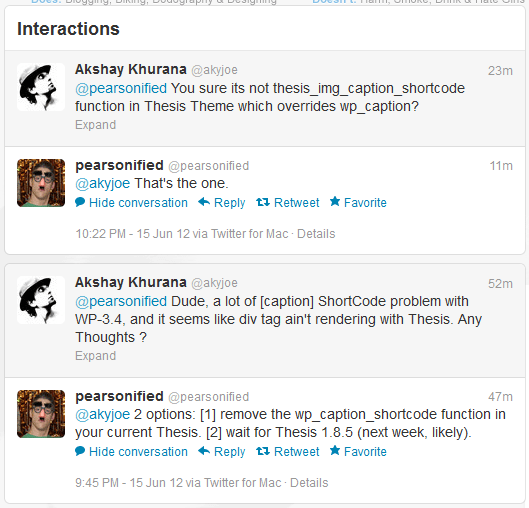
    An update for Thesis Theme will be available for its users by next week, as said by Chris Pearson. He has also suggested 2 options for Thesis users which you can check out in a Conversation with Chris on Twitter, in screenshot below:

    chat with chris thesis owner
    Interaction with Chris for Thesis Update

    I chose to wait for Thesis 1.8.5, as it’s not recommended to mess with Thesis core files.

    Thesis 1.8.5 is Available now ?

    Yes, new version of Thesis Theme is available for download now. Click here or the image below saying Thesis 1.8.5

    Thesis 1-8-5 bug fix release
    Get Thesis Theme 1.8.5

    (Post Updated on 19/06/2012)

    Whats next ?

    Have a similar problem with Image Caption Box Alignment after WordPress 3.4 Update ? Ask your theme developer now, for a fix. Whereas if you have a proper solution to it, then share it with us here, by posting a comment below.

  • How to add Social Media Share Count Buttons in WordPress Blog ?

    If you are looking forward to boost blog traffic then make sure that you have Social media buttons on your blog. When we talk about the Web2.0, social media buttons have been replaced by the new share count buttons trending Facebook Like Button, Tweetmeme, Twitter Share button and etcetera. In this article, we will learn to add different social media button in WordPress.

    social-share-count-button
    Social Share Count Button for WordPress

    Different Social Share Buttons

    As mentioned above, social share buttons on website is like a car with wheels, and you cannot move ahead without them. I have already covered some Social media buttons in my previous articles, whereas if you have missed any then you can find them below:

    Share Button Codes for WordPress

    For ease of access I have complied all social share button codes in this article so that you can simple add share count button in WordPress Website.

    Make sure you take full backup of single.php file using FTP before modifying it.

    Retweet Button

    [php]
    <script type="text/javascript">
    tweetmeme_source = ‘thecreatology’;
    </script>
    <script type="text/javascript" src="http://tweetmeme.com/i/scripts/button.js"></script>
    [/php]

    Above code is for the Retweet Button, make sure to change the tweetmeme_source @thecreatology with your twitter handle. To see more options you may refer the original post How to Add ReTweet Button in WordPress Blog.

    Official Twitter Button

    [php]
    <a href="http://twitter.com/share" data-url="<?php the_permalink(); ?>" data-count="vertical" data-via="thecreatology" data-related="Aky Joe:He is Cool!">Tweet</a>
    <script type="text/javascript" src="http://platform.twitter.com/widgets.js"></script>
    [/php]

    Above code is for the Official Twitter Button, make sure to change the data-via @thecreatology & data-related with your twitter handle. To see more options you may refer the original post How to Add Official Twitter Button in WordPress Blog.

    Facebook Like Button

    [php]
    <iframe src="http://www.facebook.com/plugins/like.php?href=<?php echo urlencode(get_permalink($post->ID)); ?>&amp;layout=standard&amp;show_faces=false&amp;width=450&amp;action=like&amp;colorscheme=light" scrolling="no" frameborder="0" allowTransparency="true" style="border:none; overflow:hidden; width:450px; height:60px;"></iframe>
    [/php]

    Above code will add Facebook Like Button, make sure that you add the code in WordPress Post Loop. There are also different layouts to configure Facebook Like Button, which you can find in the original post How to Add facebook Like button in Website.

    LinkedIn Share Button

    [php]
    <script type="text/javascript" src="http://platform.linkedin.com/in.js"></script>
    <script type="in/share" data-url="<?php the_permalink(); ?>" data-counter="right"></script>
    [/php]

    Above code will add LinkedIn Button, make sure that you add the code in WordPress Post Loop. There are also different layouts to configure Linked Button, which you can find in the original post How to Add LinkedIn Share Button in WordPress Blog.

    Google Like +1 Button

    [php]
    <script type="text/javascript" src="https://apis.google.com/js/plusone.js"></script>
    <g:plusone></g:plusone>
    [/php]

    Above code will add Google Like Button, make sure that you add the code in WordPress Post Loop. Google Plugin button can be configured in three ways, for which you can refer to the original post How to Add Google +1 Like Button in WordPress Blog.

    Is that it ?

    Well yes, these were some popular social count buttons which I shared above, for a WordPress blog. If you think I missed any other share button, then you can share with us by posting a comment below, respecting the fact that Sharing is Caring. 😉

  • How to crop image and resize image using WordPress Image editor ?

    Are you looking for Image editor online to crop images for WordPress blog ? Well, I would like to tell you that WordPress 3+ version has its own image editor which can be used to crop images, rescale images and resize images from the Dashboard Admin Panel.

    WordPress Image EditorIn this article we will learn, how to crop image and resize image using WordPress Image Editor. The Tutorial has been divided into two sections, one explains about cropping an image while other explains about resizing an image in WP Admin.
    How to Crop Image in WordPress ?

    Image Cropping tool in WordPress just makes it handy for to handle your huge 4000×2500 pixel digital camera snapshot. WordPress Crop tool allows you to select vital area in image and resize it automatically. To crop an image:

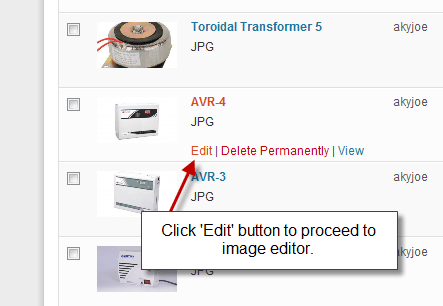
    • Login to WordPress Admin and Navigate to Dashboard > Media .
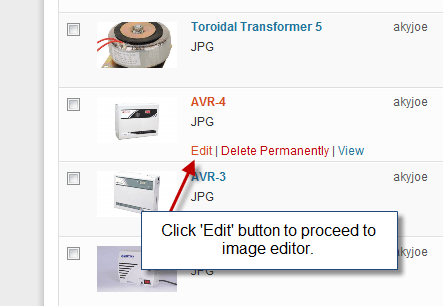
    • Select any existing image from media or you can also upload new image from computer. (Refer to screenshot below)

    Select Edit image from media
    Select Edit image from media (Click to Zoom)

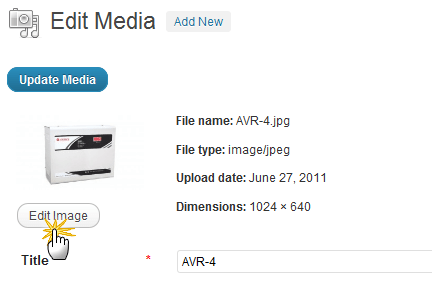
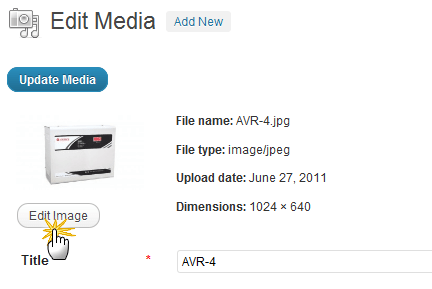
    • Further it will open Edit Image media, and under the thumbnail image click the Edit Image button to open WordPress Image Editor. (Refer to screenshot below)

    Select Edit image button
    Select Edit image button (Click to Zoom)

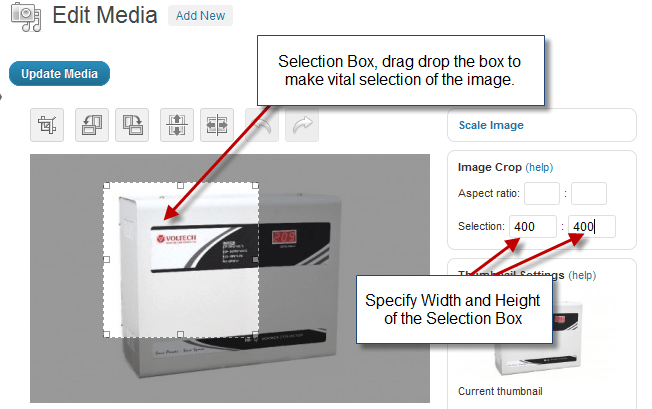
    • Next you will see the Image Editor page, where cropping of images can be done. Refer to screenshot below.

    Crop Image using WordPress Editor
    Crop Image using WordPress Editor (Click to Zoom)

    In the above screenshot you can simply Drag the selection on the image visible on left pane and click Update Media Button to apply changes, if you are not satisfied use Undo Button and crop image again.

    (Note: Once the Media has been updated you can revert back.)

    How to Resize Image in WordPress ?

    Image resizing for blog is tough to fit image as per the size. But with WordPress everything is like easy, click a away.  With WordPress image editor you can rotate, flip and scale your image without any extra efforts. To resize an image:

    • Login to WordPress Admin and Navigate to Dashboard > Media .
    • Select any existing image from media or you can also upload new image from computer. (Refer to screenshot below)

    Select Edit image from media
    Select Edit image from media (Click to Zoom)

    • Further it will open Edit Image media, and under the thumbnail image click the Edit Image button to open WordPress Image Editor. (Refer to screenshot below)

    Select Edit image button
    Select Edit image button (Click to Zoom)

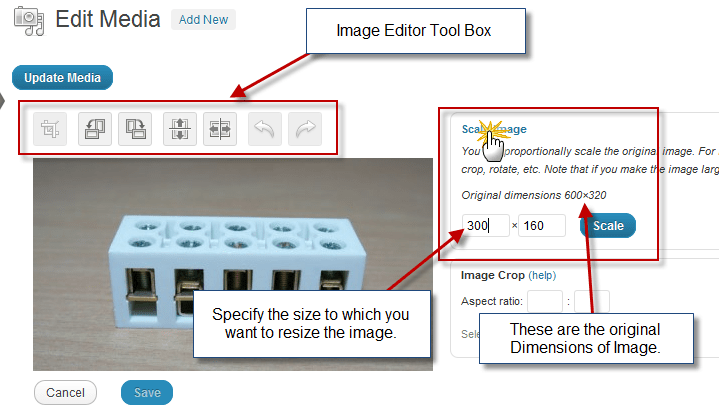
    • Next you will see the Image Editor page, where you can Resize and Rescale your Image using WP Image Editor. Refer to screenshot below.

    Resize Image using WordPress Editor
    Resize Image using WordPress Editor (Click to Zoom)

    In the above screenshot you can specify width height parameters on right pane and click Scale Button to apply changes, if you are not satisfied use Undo Button and rescale image again.

    (Note: Once the Media has been updated you can revert back.)

    We Are Done

    Image editing is easy within WordPress and you don’t have to install plugins or use any Image Editor online, but use WordPress image editor. Share with us How did you like WordPress Image Editor ?

    If you have any queries or further assistance is required, you can post feedback as comment below.

  • Tutorial to add Google +1 Like button on WordPress Blog ?

    After the launch of Twitter Follow button for website, it was Google who came up with their +1 Like button on social media. Google like button helps your online contacts, friends to find the best stuff when they Google search for some stuff. Its being said that Google like button will be in good competition with Facebook Like button in the coming times.

    How +1 Google Button Works ?

    Google Like button
    Google Like button

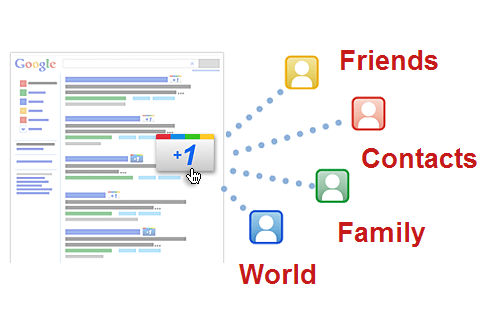
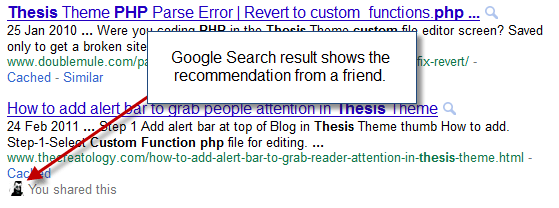
    As I mentioned above, Google +1 button is a recommend button and it works more like a Vote button. When you click Google +1 button on website, it add recommend that particular page on Google Search Results. When any of your Google contact or a friend searches for relevant article, Google displays that article, with your vote and a small photo in search result, just like in screenshot below:

    Google like button Working
    Google Search Results

    Google Like Button Code for Website

    In WordPress, blog placement for Google like button on single post is effective, as usually a visitor will only share it after going through the post. There are 4 different types of Google Like button developed to fit best on your website. Below is the Google like button code for WordPress to add Google +1 Like Button on single post and you can add the code in single.php file.

    Make sure you take full backup of single.php file using FTP before modifying it.

    [php]

    &lt;script type=&quot;text/javascript&quot; src=&quot;https://apis.google.com/js/plusone.js&quot;&gt;&lt;/script&gt;
    &lt;g:plusone&gt;&lt;/g:plusone&gt;

    [/php]

    If the above code doesn’t fit in your theme layout, you can play around with 4 different set of buttons, click here to know more.

    We’re Done!

    Once you have updated the code, save single.php file and upload it on server. Now you can refresh any single post on website, it will look something like in the screenshot below:

    Google Like button preview
    Google Like button in Single Post

    Isn’t it looking cool ? Welcome, now that we have learned how to add new Google Like Button on Website. Let us know your opinions about the Launch of New Google Button in Social Media, by posting a comment below.

    If you have any query or further assistance is required, you can post a comment as your feedback.

  • Tutorial to add Facebook Send Button on WordPress Blog ?

    In a recent update from Facebook which now allow publishers to add Send button on website or blog. Almost everyone on internet has a facebook account and too have a social circle around the globe. Using a new send button user can share information in their network. In a recent post I explained about the Tell a friend button for WordPress, and facebook send button is quite similar to it. In the article we will learn to add new Facebook Send Button on WordPress blog.

    Facebook Send Button on WordPress
    Facebook Send button for WordPress

    How Facebook Send Button Works ?

    The new facebook send button allows users to share your content with their friend using an email to any email address or inbox them on Facebook. A user can also mention the name of the Group and post the URL on the group wall.

    Facebook Send Button Code

    In WordPress blog, effective placement for send button is on single post, as usually a visitor will only share it after go through the post. Below is the send button code for WordPress to add facebook send button on single post and you can add the code in single.php file.

    Make sure you take full backup of single.php file using FTP before modifying it.

    [php]
    <div id="fb-root"></div><script src="http://connect.facebook.net/en_US/all.js#xfbml=1"></script>
    <fb:send href="<?php echo get_permalink(); ?>" font=""></fb:send>
    [/php]

    Is that it ?

    No it is not. The above code snippet will just add Send button on your WordPress blog, but so far I believe this method will not be that effective, as Stand Alone Send button will be less prominent. But, if we combine and add a Facebook Like  Button with Send Button and it will increase your Like Counter as well. Below is the code snippet to add facebook send and like button together, and you can add the code in single.php file.

    Make sure you take full backup of single.php file using FTP before modifying it.

    [php]

    <div id="fb-root"></div><script src="http://connect.facebook.net/en_US/all.js#xfbml=1"></script>
    <fb:like href="<?php echo get_permalink(); ?>" send="true" layout="button_count" width="300" show_faces="true" font=""></fb:like>

    [/php]

    Now, the above code will add Like button followed by new send button. I hope facebook send button will be effective for visitors and sharing information around their networks will be flexible now. Let us know about this new development from facebook by posting a comment below.

    If you have any query or require further assistance, you can post comment as your feedback.