Author: Aky

  • 3 best ways to style blockquote for your blog

    A blockquote is a XHTML tag which is purposely used element in an article. The basic usage of blockquote in an article is when an author wants to post a thought, or a long piece of sentence from another resources or another author. Just like I did on my testimonials page, where the text posted is in voice of a different author, and hence I wrapped it between a blockquote tag. Screenshot below might just clear you a bit.
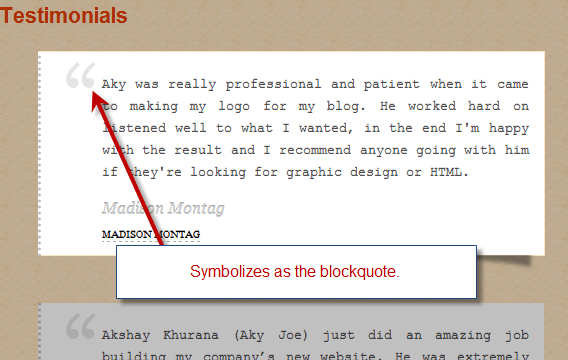
    thecreatology-blockquote-design

    A blockquote usually highlights a text and break it apart from main content. For idealistic authors blockquote is tool to make an article more interesting for the reader. A double quote character (“ This is my thought! “) represents the content as a phrase, quote or a thought.

    Usually every web browser has a default styling for Blockquotes, but we can always refine a default styling with something in relevance with theme, or may be out of the box design. In this article, I will share 3 best ways to style blockquote for your blog, using CSS.

    Style 1: Blockquote styling with Images

    With CSS, we are no just limited to color, we can always use background images so as to make blockquote distinct with content. Adding image to blockquote will make it eye-catchy and elegant. We will also have to add left padding, so that text doesn’t overlap the image. Screenshot below will make it more clear:
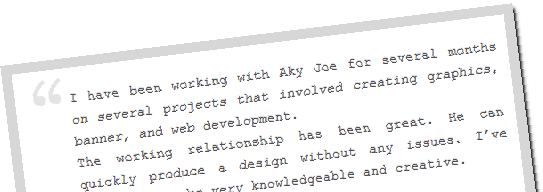
    thecreatology-blockquote-image-design

    Below, is the CSS code to add an image to blockquote which you can append in theme’s stylesheet, STYLE.CSS or CUSTOM.CSS (for Thesis Theme):

    [css]

    blockquote{
    background:url(‘blockquote.png’) no-repeat;
    padding: 5px 5px 5px 20px;
    border:3px solid #ddd;
    }

    [/css]

    Style 2: Blockquote styling with Drop Caps

    Adding Drop caps to a content, is a Latin initialis typographic approach, which means standing at the beginning. Drop cap is decorating the initial letter of a paragraph and making it more attractive. In this example, I have added drop cap to blockquote, using the pseudo class to increase the size of the first letter in the paragraph. You can also refer the screenshot below, to add drop cap in blockquote:
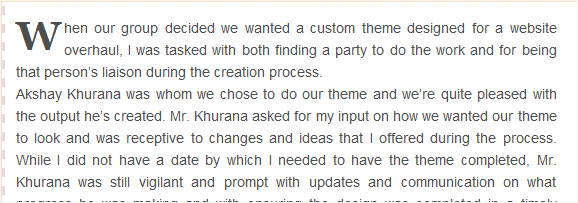
    thecreatology-blockquote-dropcaps-design

    Below, is the CSS code to add an image to blockquote which you can append in theme’s stylesheet, STYLE.CSS or CUSTOM.CSS (for Thesis Theme):

    [css]

    blockquote{
    background:#fff;
    padding: 10px;

    border-left:2px dashed #ddd;

    }

    blockquote p:first-letter {
    float: left;
    margin: 5px 3px 1px 0;
    font-family: Georgia;
    font-size: 40px;
    font-weight: bold;
    }

    [/css]

    Style 3: Blockquote styling with Fonts & Colors

    If you find above styles, like using images and drop caps, a bit complex then you can consider another way which is simple yet highly effective style for blockquote. Font property itself has so many attributes for styling, for instance font-style (italics) or font-variant (small-caps). In this example, will require the use of pseudo-classes in order to insert content before and after the blockquote. Screenshot will clear it more:
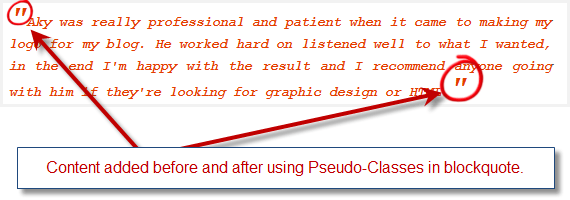
    thecreatology-blockquote-fonts-design

    Below, is the CSS code to add an image to blockquote which you can append in theme’s stylesheet, STYLE.CSS or CUSTOM.CSS (for Thesis Theme):

    [css]
    blockquote {
    color: #e33e00;
    font-style: italic;
    font-family:’Courier New’, Courier, monospace;
    padding:20px;
    background:#fff;
    }
    blockquote p:before {
    content: ‘"’;
    font-size: 30px;
    }
    blockquote p:after {
    content: ‘"’;
    font-size: 30px;
    }
    [/css]

    I am using blockquote styling for my blog as well, and you can see the demo as below.

    Blockquote Style Demo:

    A body makes his own luck, be it good or bad.

    If you have seen any other example or have an idea to style a blockquote, I would like to hear from you. If you have any queries or if further assistance is required in regard of the article, post comment as your feedback.
  • Ease with Thesis WordPress Theme Design options panel

    Thesis v1.8 is so far the best version up till now and waiting for the next update of thesis theme, that is Thesis v2.0. If you haven’t bought the copy of Thesis yet, click on the link here to Download Thesis Theme.

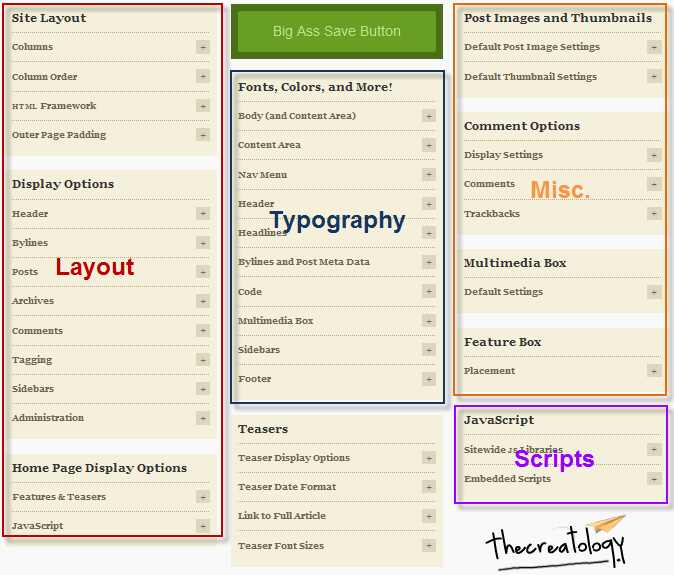
    About thesis wordpress theme, great SEO and flexibility is not all, Thesis has a lot of inbuilt design options panel for enhancing the typography as well as the layout of the blog. In this article, I will give you a quick overview of the Thesis WordPress Theme Design options panel. Thesis Design options are sorted into different sections like layout, typography, Scripts and other Miscellaneous options. You can also refer to the screen shot below:

    Thesis-Theme-Design-Options-thcreatology

    Thesis theme design options panel will ease you in organizing the website content in an efficient way. Here under, I will explain you about the Layout, Typography, Scripts and Misc. options.

    Layout

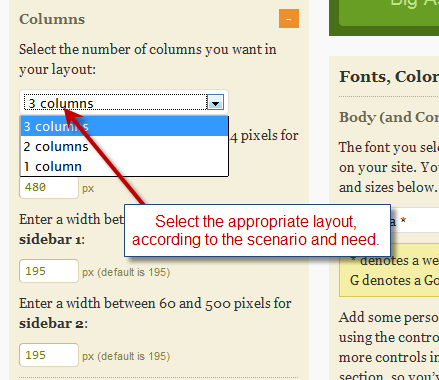
    Layout of the website is what matters the most, and it depends upon the nature of the website. For instance a 3 column layout website  is effective where there is more of content to be published, like a magazine style WordPress theme has. Thesis Theme has an option to switch between 3-column, 2-column or 1-column. Below is a screenshot which shows the layout selection in Thesis Theme.

    Layout-Thesis-Theme-Design-Options

    Typography

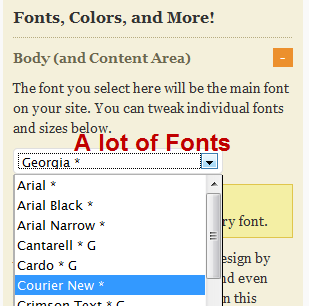
    Fonts play a vital role in presentation of the content on website. Thesis Theme has variety of options to enhance and customize Typography of a blog. There are a lot of fonts, comprising the Gothic, Typewriter, Old english style etc… We can also vary the different fonts in different parts of the website, for instance assigning Arial to Navigation Menu, Georgia to Post Title and Verdana to Body content. Below is a screenshot for selecting the fonts in thesis theme.

    Fonts-Thesis-Theme-Design-Options

    Scripts

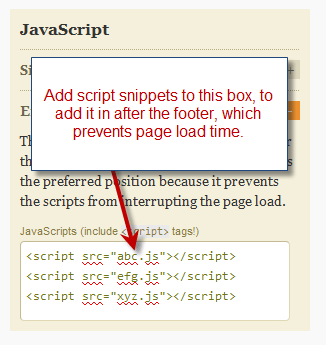
    Everyone of us are aware of JavaScript and jQuery codes which enhances the usability of the websites. There is a drawback of using these scripts as they take time to load in browser depending upon the network and system. Usually scripts snippets were added in header which on parsing by browser increases load time of the website. Yet another benefit of Thesis Theme is that it allows you add scripts in a preferred position, so that it doesn’t affect the page load time. Refer to the screenshot below:

    Scripts-Thesis-Theme-Design-Options

    Miscellaneous

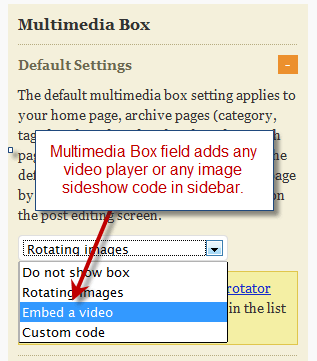
    A website is incomplete without multimedia presentation or a content slider or may be a video in it. Thesis Theme has a multimedia box widget for sidebar, which can embed video player, image sideshow or any other multimedia content. It also has a custom code option in the list, which can add any code snippet likely a flash or a Javascript. Refer the screenshot below:

    Miscellaneous-Thesis-Theme-Design-Options

    There are still a lot of options in Thesis Design Options, as I chose to brief you about essential ones. I will summarize the essential points discussed above for the ease of Thesis WordPress Theme Design options panel, before ending this article.

    Summary of Thesis Design options:

    1. Select Layout Option depending upon the need (3-column, 2-column or 1-column).
    2. Select fonts and vary fonts in different parts of website to enhance Typography.
    3. Add code snippet in order to prevent page load time.
    4. Add multimedia content for effective presentation in website.

    For any queries or assistance required, post comment as your feedback. If your WordPress blog is currently using a custom theme, then you can also redesign it using the Thesis Theme Services.
  • Tutorial to Install Thesis Theme on a WordPress Blog in 3 steps

    When it comes to great features, Thesis WordPress Theme is what comes in my mind for a WordPress Blog or website. Being a Thesis Developer, I believe Thesis Theme is highly SEO optimized with many other flexible options.

    In this tutorial, I will guide you to install Thesis theme on a WordPress Blog. If you haven’t bought a Thesis Theme yet, then you can buy/download your thesis copy now by visiting the link: Download Thesis Theme

    After buying, login to the Thesis Theme account on DIYThemes, where you can have a fresh copy of Thesis WordPress Theme and it will be in a Zip format. (Save the zip file on your hard disk for future reference)

    Once you have the thesis theme, follow the procedure below:

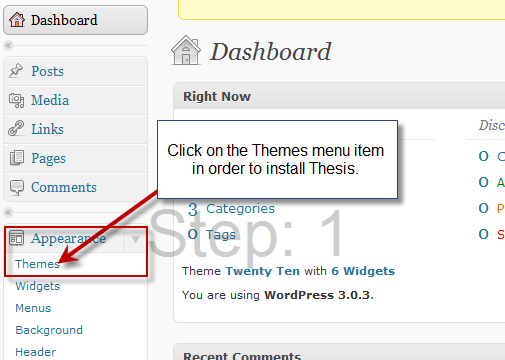
    • Step #1: Login to the WordPress Dashboard  Admin and navigate to Appearances > Themes. (you can also refer the screen shot below)

    step1-install-thesis-theme-tutorial

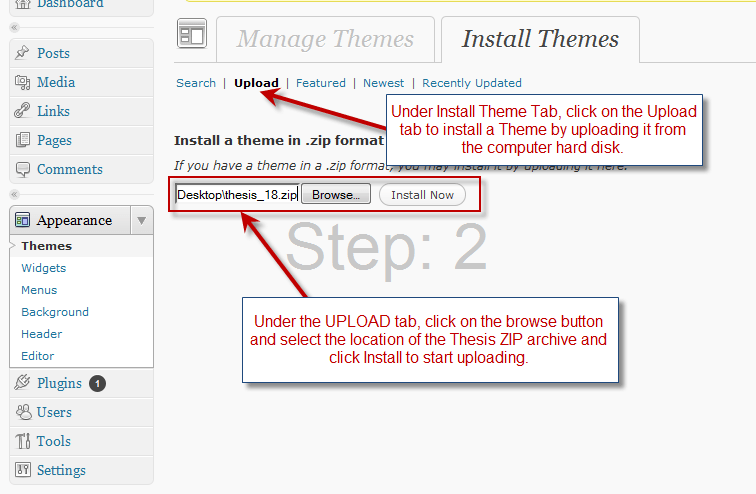
    • Step #2: On clicking the Themes menu item under Appearance, we land to Theme Management for WordPress. Select the Install Themes Tab and further click on Upload link. Using the Browse button navigate and select the thesis_18.zip file on the hard disk. Now, click the Install Now button to upload it.  (you can also refer the screen shot below)

    step2-install-thesis-theme-tutorial

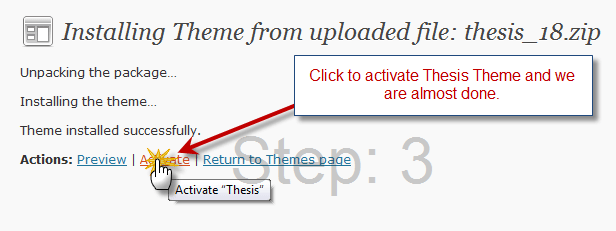
    • Step #3: On next screen, click on Activate button to apply Thesis as your WordPress Blog Theme now. If not now, we can also skip this step, by clicking on the Return to Theme page button.  (you can also refer the screen shot below)

    step3-install-thesis-theme-tutorial

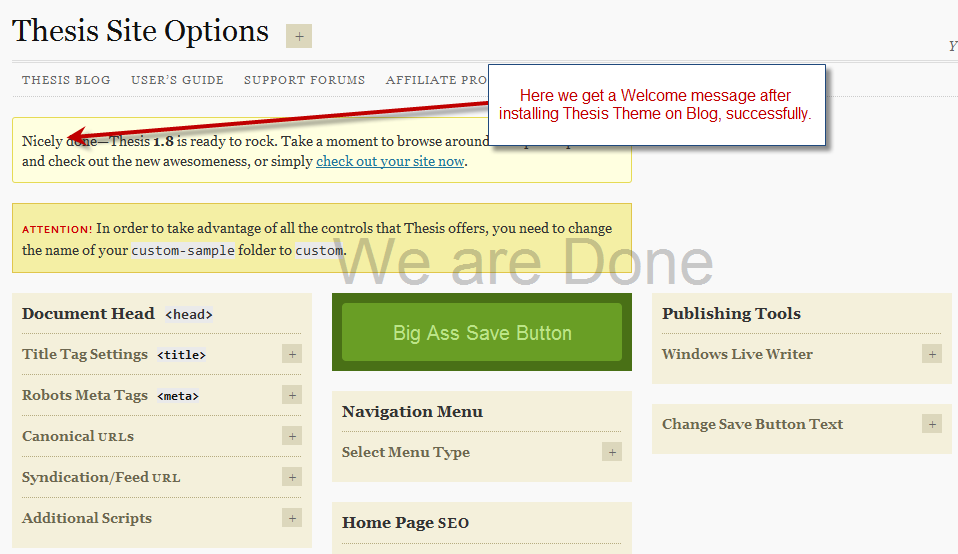
    • We are done: On activating Thesis theme in the above step, you will be redirected to the Thesis Site Options Page and greeted with a welcome message, which indicates that the Installation of Thesis theme was successful. (you can also refer the screen shot below)

    step4-install-thesis-theme-tutorial

    With this we come to end of this tutorial, but you can look up or play around with Thesis Options. For any query or further assistance required post your feedback as comments below.

    I will come up with more articles on Thesis Options and Customizations soon. If your WordPress blog is currently using a custom theme, then you can redesign it using the Thesis Theme Services.

  • Real Estate WordPress theme design for CBUS Properties

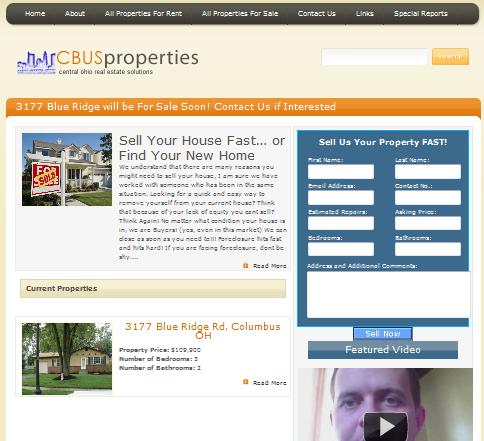
    CBUS Properties is a real estate investing company in Columbus, USA which is currently buying, repairing and selling/renting properties in the area. The founder of the company connected me via Twitter and wanted me to revamp the old website with latest web standard, using WordPress.

    Real estate websites design require a capability of displaying News Headline, featured box and a contact form. The custom wordpress theme was designed for CBUS Properties, which included all the features listed above for a real estate website. I used JavaScript method to develop and authenticate the custom contact form. The project took a week’s time to meet the client’s requirement and in no time, it was published too.

    Below you can see a screenshot for the CBUSProperties.com:

    CBUSProperties.com Screenshot
    Web design by TheCreatology

    You can also visit CBUSProperties.com here. If you like this work,  post comments as your feedback, or if you want something similar for your website, contact me below.

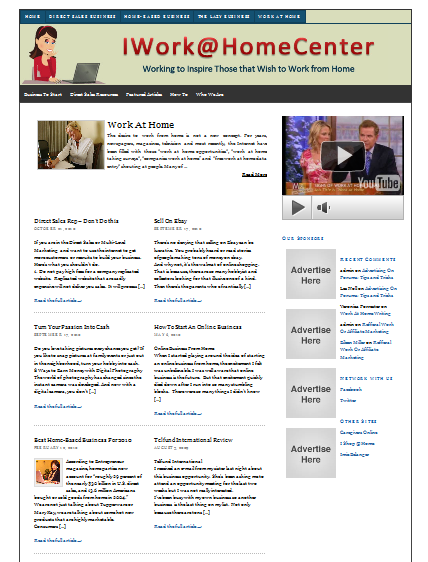
  • Thesis WordPress Theme Customization for I Work at Home Center

    I Work at Home Center is a WordPress blog, which inspire people who love working from home. The blog is designed on Thesis WordPress theme, which is highly customizable and SEO friendly. Web Administrator contacted thecreatology for the thesis customization service, and also wanted me to design a header graphic for them.

    Thesis WordPress Theme customization is though click-a-way work, only you need is to create directions for it. Client supplied me detailed brief for the project, and I simply worked as per the directions. And in 3 hours the work was published, and too was appreciated by the client.

    Below you can see a screenshot for the I Work at Home Center.com:

    image

    You can also visit I Work at Home Center.com here. If you like this work,  post comments as your feedback, or if you want something similar for your website, contact me below.

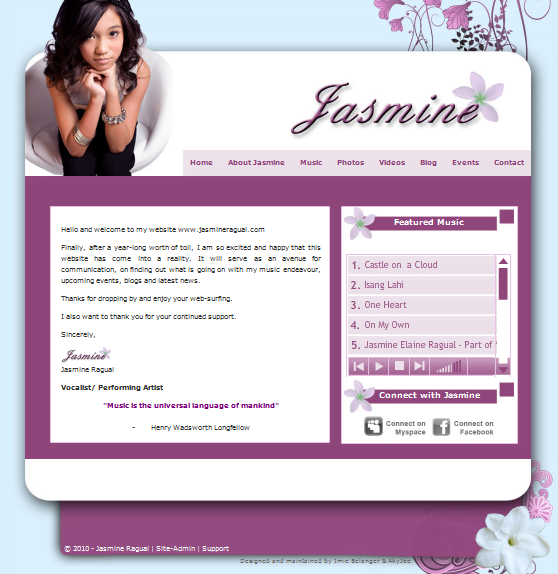
  • Music Portfolio Website design for Jasmine Ragual

    Jasmine Ragual is a young singer in Ontario, Canada who has a love voice and great endeavor for music. It was a great pleasure and honor to design music portfolio website for the upcoming star.

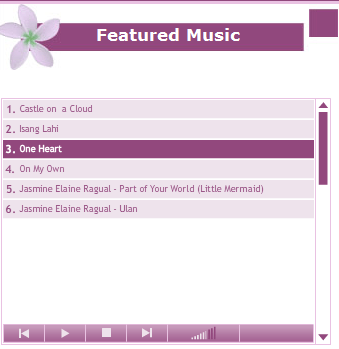
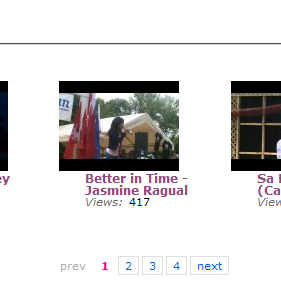
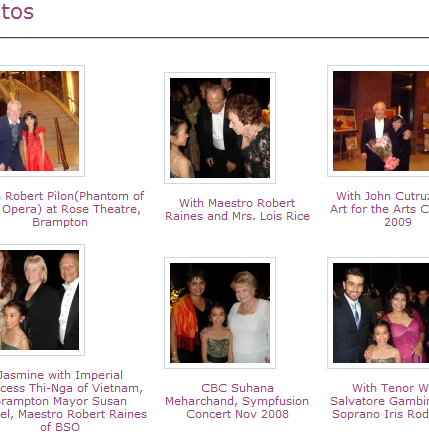
    JasmineRagual.com is a portfolio website, it includes photo gallery, video gallery, music gallery and blog. The website was a bit complex, but WordPress did it all and with all flexibility. The website was designed with custom WordPress Theme exclusively for Jasmine Ragual.

    Below is screenshot of the website:

    image
    Web design by TheCreatology

    Also, some more screenshots of the website like music player, photo gallery and video gallery:

    image
    Music Player
    image
    Video Gallery
    image
    Photo Gallery

    You can also visit Jasmine Ragual. If you like this work,  post comments as your feedbacks, or if you want something similar for your website, contact me below.

  • Website/Blog designed for Capital Striders

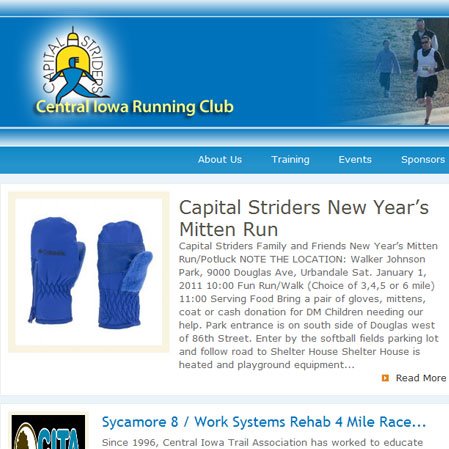
    CapitalStriders is a Central Iowa Running Club, which encourage  and promote running through the education of the community on the benefits of physical fitness and amateur sport. Website administrator connected me via twitter, and it was my first freelance web developing project, over the web.

    I took the challenge and designed a unique design for the running Club as per the brief.  WordPress custom theme was too developed in no-time, and soon was published. Client appreciated my work, and the feedback was my profit.

    Below is a screenshot of the website CapitalStriders:

    Web Design by TheCreatology

    You can also visit CapitalStriders. If you like this work,  post comments as your feedback, or if you want something similar for your website, contact me below.